Forum Discussion

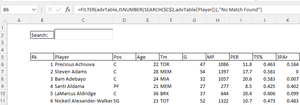
Restrict spill range when TextBox is empty using FILTER, ISNUMBER, SEARCH?
- Feb 16, 2022
exceltw What do you get when you just enter =ISBLANK(C2) is some other cell? And I wonder why you have a text box to begin with. Can't you just enter the search word in C2 directly?

Thanks Riny_van_Eekelen,
I tried your formula and the data from the formula in B6 continues to display/spill out.
I think this may be because the SearchBox hovering over C2 is linked to cell C2 so the logic of the ISBLANK(C2) formula is returning FALSE when nothing is in the SearchBox.
This is what has left me stumped.

exceltw What do you get when you just enter =ISBLANK(C2) is some other cell? And I wonder why you have a text box to begin with. Can't you just enter the search word in C2 directly?
- exceltwFeb 16, 2022Copper Contributor
Hey Riny_van_Eekelen
=ISBLANK(C2) returns FALSE
I will try this without a text box and report back with a screenshot.
- exceltwFeb 16, 2022Copper Contributor
IT WORKED WITHOUT THE TEXT BOX! I switched the cell from C2 to E2 (no text box) and it worked! THANK YOU!
- Riny_van_EekelenFeb 16, 2022Platinum Contributor
exceltw Great that you could resolve it!
- Riny_van_EekelenFeb 16, 2022Platinum Contributor
exceltw Or use =IF(C2="",.............)