Forum Discussion

Restarting Formulas at Specified Data Points
- Jun 24, 2021
Rich_100 Okay, let's give it a try. You can follow the applied steps in my file. No need to reverse engineer them. But, ignore the query "Table1". I forgot to delete it.
Step 1 was to create a separate table with just the Customer, Age and Gender.
Step 2 is to go back to the same source (Query "Table1 (2)". Remove some unwanted columns. Then merge the query from step 1 with the cleaned-up table in step 2. This will add the Age and Gender to each Customer record. Reorder columns and then, probably the most important step is to select the customer, age and gender columns and then select to "unpivot other columns", Then you get a long list of "records" from which you can filter out the date fields.
Now you can merge the "Attribute" and "Value" columns, separated by a colon. Close and load to a table, to create the output that you see in columns M:P.
Step 3 is to create pivot table from that table (i.e. the end result from Step 2) in order to give you the condensed view per customer.
As you noticed, PQ has quite a steep learning curve. But once you get over the first hurdles, you'll love it. Good luck!

Hi Riny_van_Eekelen,
Thanks for getting back to me and suggesting the use of Power Query. I’m new to this feature, so just looking into how to use it now.
I've had to sign an NDA with this client, so don't think I'll be able to use anyone’s real data. In place of this, I have drafted some dummy data in the same format. Would this be OK for what you need?
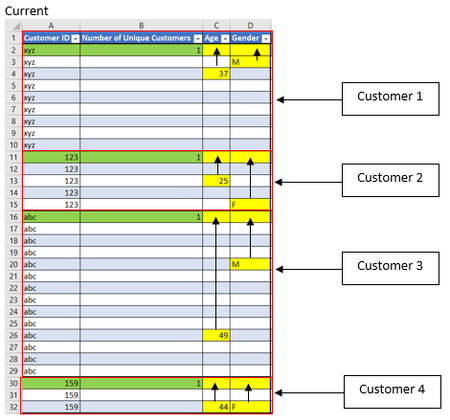
To confirm, the data set is a few hundred thousand cells and the yellow cells in the attached Excel workbook are for the data I am hoping to calculate in the following format:
- Age (column C) and gender (column D) – pull data from the corresponding columns to the top line for each client
- Active member (column H)
- An active member is someone who has paid their membership within the last 2 months
- For columns I – N, I just need to get a count of occurrences from the relevant columns for each client
Thank you for any advice or guidance you can provide, it’s greatly appreciated, and please let me know if you have any questions?
I’m going to have a play around with Power Query now and see if I can make any head way.

Rich_100 Thanks for uploading. Very helpful. Not able to look at this right now. Welcoming others to jump in.
- Rich_100Jun 23, 2021Copper ContributorAll good, thanks. I need to deliver this work to the client by Monday 28th of June, so will continue to play around with Power Query and see where I get to. Any input, tips and tricks are definitely welcome!
- Riny_van_EekelenJun 24, 2021Platinum Contributor
Rich_100 Forgive me for challenging your reporting request, but perhaps you could consider a more condensed approach. Rather than creating a large, rather unstructured, list with sub totals of some kind, why not create one ore more reports on the bases of cleaned and unpivoted data. A rough example is included in the attached workbook. I chose to load an intermediate table into Excel, just to demonstrate. In reality, you would probably load it into the Data Model and work from there.
- Rich_100Jun 24, 2021Copper ContributorThanks for the response Riny_van_Eekelen, the data looks great! I’ve been asked to help on a project, which is outside of my usual area of expertise, so any advice or recommendations for the most efficient way to sort and display this data is definitely welcome.
Currently, I am learning Power Query as I go, which is a fairly steep learning curve. I’ve tried to reverse engineer what you’ve done, and made some head way, but can’t seem to get my outputs to look as clean as yours. Would you mind detailing your steps please?