Forum Discussion

Ramu2603
Jan 21, 2024Copper Contributor
Require small help on "Conditional Formatting"
Hello Community, Have prepared an excel sheet where I keep track of ongoing projects. To make it little more interactive I made three conditional formatting rules which ...
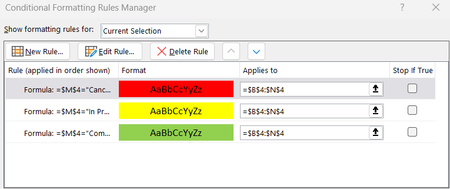
- Jan 22, 2024
Hi Ramu2603
You should format your data as a Table this will allow formulas to auto-adjust as you add new rows:
Then, with the above Table set the following Cond. Format formulas (no $ after $M😞

Lorenzo
Jan 22, 2024Silver Contributor
Hi Ramu2603
You should format your data as a Table this will allow formulas to auto-adjust as you add new rows:
Then, with the above Table set the following Cond. Format formulas (no $ after $M😞

Ramu2603
Jan 22, 2024Copper Contributor
One more request, how do I use this 3 sets of conditional formatting for other Columns as well. For Example I want the cells to change color for Column B,C,D,E respectively
- LorenzoJan 22, 2024Silver Contributor
For Example I want the cells to change color for Column B,C,D,E respectively
Update the Applies To ranges:
PS: When you get a solution, there's a Mark as response at the botton that helps people who Search - Thanks
- Ramu2603Jan 22, 2024Copper ContributorThanks once again @Lz, please correct me if I am getting it wrong. "Applies to = $B$4:$E$4", with this condition changes will get applied to only 4th cell of Column B to E.
Whereas my intention is to apply the coloring condition to all cells from $4 to $500 of Column B to E.
I hope you got what I am trying to convey- LorenzoJan 22, 2024Silver ContributorPlease carefully review the picture I posted. It doesn't say "Applies to = $B$4:$E$4"