Forum Discussion

Report: grouped by rows & columns (is this possible?)
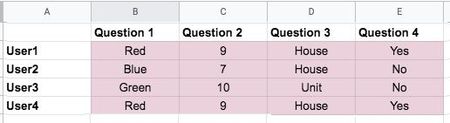

stevep17 "Is this possible to achieve in Excel?" The answer is Yes!
How exactly is a bit difficult to explain in words, without some real data to play with. From looking at the pictures, I would first connect to and transform the data a bit with Power Query, then load the data into the Data Model. Then you need som DAX code that allows the text based answers to be entered in the value field of a pivot table.
Now, this may sound all very alien, if you have never seen or heard of this before. And if you are on a Mac, you can forget it altogether. So, if you can provide a file with some real, but anonymous data, I or someone else can get you started.

- Riny_van_EekelenJun 07, 2021Platinum Contributor
stevep17 Something like in the attached file perhaps. First a bit of cleaning up in PQ, then some Power Pivot.
- stevep17Jun 08, 2021Copper ContributorYes! That's it exactly.
We're hoping to get to this with the click of a button...if that's possible (a macro)?
We need a regular non-power user to be able to take the raw survey report and transform it easily to this end result.- Riny_van_EekelenJun 08, 2021Platinum Contributor
stevep17 The easiest would be to connect to the file with the raw data, and then click "Refresh All" on the Data ribbon. That will connect to the data, transform it, load it into the data model, and update the pivot table. Personally I would not go so far as to write VBA code just to refresh.
But make sure that the data is in a structured table and clean, i.e. get rid of the empty column B, no merged cells, no fancy formatting needed.
The user doesn't need advanced skills to use such a schedule and the advantage it that the raw data is not touched/changed in any way. Since you have used PQ before, you'll know what I mean.