Forum Discussion

Reorder Cell Data Using Power Query
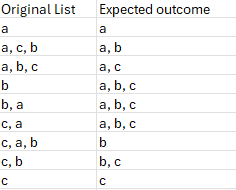

This game of clicking 'show more' and typing links to other contributors is getting somewhat tedious. Your formula works perfectly. It took me a moment to realise that you were defining Lambda functions and using thunks in the formula.
I finished up with
Worksheet formula
= SORTLISTWORDSλ(original)

where
SORTLISTWORDSλ
= LAMBDA(list,
    LET(
        //  Form overall list of sorted rows
        array, MAPλ(list,
            LAMBDA(string,
            // Sort comma-separated strings
                LET(
                    split, TRIM(TEXTSPLIT(string, ",")),
                    sorted, SORT(split, , 1, TRUE),
                    sorted
                )
            )
        ),
        sortedList, SORT(array, {2,3, 4}),
        orderNum, VALUE(TAKE(array,,1)),
        BYROW(SORTBY(array, orderNum), ARRAYTOTEXT)
    )
);
The complexity is hidden in the MAPλ function which is one of my standard workhorses that I use to work around the limitations of the built-in MAP function. One reason for the excessive length is that I have sorted the first column as numbers with 5 coming before 10.
I am aware that the OP asked for PQ, but you seem to have that covered. Who said that PQ is a low code environment?

PeterBartholomew1 , I had no doubt you do that in more elegant way. But for that we need to have your MAPλ in the library. As for PQ that's Lorenzo who gave more universal and advanced solution, if only to change slightly on working with words.
In general, working in PQ mainly with SQL database and OData sources I prefer set of low code simple steps. Since more complex coding quite often breaks query folding. But if we break it in any case, such coding is definitely the advantage.
- PeterBartholomew1Nov 30, 2024Silver Contributor
Yes, MAPλ is a bit like a swan swimming: on the surface it looks serene, but that does not reflect what is going on below the waterline! I might be proud of it but, in reality, the sooner MS implements such functionality properly the better.