Forum Discussion

renee_crozier
Nov 27, 2024Brass Contributor
Reorder Cell Data Using Power Query
I'm trying to take a list of items, reorder the data in a single cell, and then alphabetize the column. Alphabetizing the column is easy but reordering the data in a cell is tripping me up. I know I ...
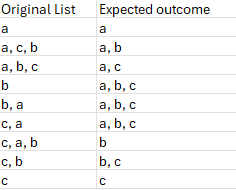

Lorenzo
Nov 28, 2024Silver Contributor
Appears to do it:
let
    Source = Excel.CurrentWorkbook(){[Name="SourceTable"]}[Content],
    custom_delimiter = ", ",
    NewList = Table.AddColumn( Source, "New List", each
        Text.Combine( List.Sort( Text.Split( [Original List] , custom_delimiter ) ), custom_delimiter ),
        Text.Type
    ),
    KeptNewList = Table.SelectColumns( NewList,{"New List"}),
    Class = Table.AddColumn(KeptNewList, "Class", each
        Text.BeforeDelimiter( [New List], custom_delimiter ),
        Text.Type
    ),
    Length = Table.AddColumn( Class, "Length", each
        Text.Length( [New List] ),
        Int64.Type
    ),
    Sorted = Table.Group( Length, {"Class"},
        {"DATA", each
            Table.SelectColumns(
                Table.Sort( _, {{"Length", Order.Ascending}, {"New List", Order.Ascending}} ),
                {"New List"}
            ),
            type table [New List = Text.Type] }
    ),
    Combined = Table.Combine( Sorted[DATA] )
in
    Combined

SergeiBaklan
Nov 28, 2024Diamond Contributor
Works differently if we split some words, not letters
- LorenzoNov 28, 2024Silver Contributor
Didn't look at anything else than the provided sample and as she hasn't provided feedback on her previous threads I did the minimum
- renee_crozierDec 06, 2024Brass Contributor
Apologies on the delay. I'm looking at your solution since the list I'm trying to alphabetize is emails. The result of your code with the adjustments to fit my spreadsheet is just a list of the names in the list, not alphabetized. Did I miss something?
Here's the adjusted code:let Source = Excel.CurrentWorkbook(){[Name="Duplicate_Link_on_Same_Page"]}[Content], custom_delimiter = ", ", NewList = Table.AddColumn( Source, "New List", each Text.Combine( List.Sort( Text.Split( [ContentOwner] , custom_delimiter ) ), custom_delimiter ), Text.Type ), KeptNewList = Table.SelectColumns( NewList,{"New List"}), Class = Table.AddColumn(KeptNewList, "Class", each Text.BeforeDelimiter( [New List], custom_delimiter ), Text.Type ), Length = Table.AddColumn( Class, "Length", each Text.Length( [New List] ), Int64.Type ), Sorted = Table.Group( Length, {"Class"}, {"DATA", each Table.SelectColumns( Table.Sort( _, {{"Length", Order.Ascending}, {"New List", Order.Ascending}} ), {"New List"} ), type table [New List = Text.Type] } ), Combined = Table.Combine( Sorted[DATA] ) in Combined - SergeiBaklanNov 29, 2024Diamond Contributor
As a comment, if to change
    /*
    Length = Table.AddColumn( Class, "Length", each
        Text.Length( [New List] ),
        Int64.Type
    ),
    */
    Length = Table.AddColumn(
        Class,
        "Length",
        each List.Count( Text.Split([New List], "," ) ),
        Int64.Type ),
when your solution returns same as Expected Outcome for words as well
