Forum Discussion

renee_crozier
Nov 27, 2024Brass Contributor
Reorder Cell Data Using Power Query
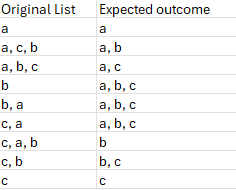
I'm trying to take a list of items, reorder the data in a single cell, and then alphabetize the column. Alphabetizing the column is easy but reordering the data in a cell is tripping me up. I know I ...

HansVogelaar
Nov 27, 2024MVP
It can be done using a single formula:
=SORT(BYROW(A2:A10, LAMBDA(s, TEXTJOIN(", ", TRUE, SORT(TEXTSPLIT(s, ", "), , , TRUE)))))
or
=SORT(BYROW(A2:A10, LAMBDA(s, TEXTJOIN(", ", TRUE, SORT(TEXTSPLIT(s, , ", "))))))
- SergeiBaklanNov 27, 2024Diamond Contributor
HansVogelaar , that's not exactly asked order
- PeterBartholomew1Nov 28, 2024Silver Contributor
I am not convinced that the asked-for outcome doesn't itself contain an error. Anyway, studiously avoiding any temptation to go for brevity, how about
= SORTLISTITEMSλ(original) SORTLISTITEMSλ = LAMBDA(list, // Sort overall list alphabetically SORT( MAP(list, LAMBDA(string, // Sort comma-separated strings and reassemble LET( split, TRIM(TEXTSPLIT(string, ",")), sorted, SORT(split, , 1, TRUE), ARRAYTOTEXT(sorted) ) ) ) ) );- SergeiBaklanNov 28, 2024Diamond Contributor
PeterBartholomew1 , I also don't know which exactly logic shall be behind. But if we change letter on word, e.g. "c" on "com", and assume expected outcome shall be the same, we have different results

