Forum Discussion

Susie_P
Aug 24, 2023Copper Contributor
Removing or hiding errors
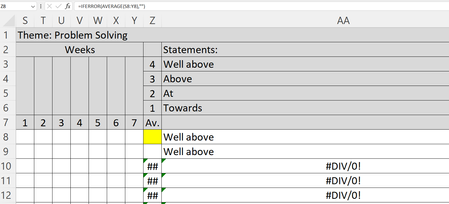
Hi there, Can anyone help please as this is driving me nuts! If so, could you take a look at the screenshots below - I have included the formulas for you to see. I am creating a document for ...
- Aug 24, 2023
To exclude errors you may use something like
=AVERAGEIFS(S8:Y8, S8:Y8, "<>#DIV/0!")Average in any case returns number. If nothing except errors then zero. To have empty string you may wrap it as
=IF( AVERAGEIFS(S8:Y8, S8:Y8, "<>#DIV/0!"), AVERAGEIFS(S8:Y8, S8:Y8, "<>#DIV/0!"), "" )


OliverScheurich
Aug 24, 2023Gold Contributor
=IF(Z8="","",IFS(Z8>=3.5,AA$3,Z8>=2.5,AA$4,Z8>=1.5,AA$5,Z8>=0,AA$6))
You can apply this formula in cell AA8.

Susie_P
Aug 24, 2023Copper Contributor
Thank you for taking the time to reply - it's fixed!