Forum Discussion

cmccully
Mar 13, 2020Copper Contributor
Remove rows based on duplicate values in one column and values in another column
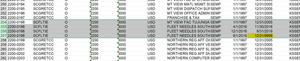
I have a spreadsheet with many groups of duplicate values in one column. I need to remove effected rows based on dates in another column. Below is a screen shot of the data. As you can see, column A ...

Subodh_Tiwari_sktneer
Mar 13, 2020Silver Contributor
You may try the below macro to delete the rows where column A has duplicate values but the date in column I is not 12/31/9999.
Sub DeleteRows()
Dim lr  As Long
Dim i   As Long

Application.ScreenUpdating = False

lr = Cells(Rows.Count, "A").End(xlUp).Row

For i = lr To 2 Step -1
    Cells(i, 1).Select
    If Application.CountIf(Columns(1), Cells(i, 1)) > 1 Then
        If Cells(i, "I") <> #12/31/9999# Then
            Rows(i).Delete
        End If
    End If
Next i
Application.ScreenUpdating = True
End Sub