Forum Discussion

zimzi86
Mar 30, 2022Copper Contributor
Remove info box - Please help!
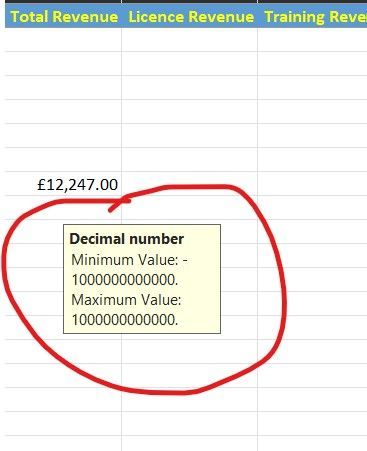
Hi, Can someone please advise how to remove the highlighted 'info box' in the image below? I cannot seem to figure out how to remove it. It appears whenever I click on a number in the excel sheet...
- Mar 30, 2022
Please be polite!
Select the cell or cells where this happens.
Click 'Data Validation' on the Data tab of the ribbon.
Click 'Clear All'.


Detlef_Lewin
Mar 30, 2022Silver Contributor
This is a message from the data validation dialogue and has been placed by the author of the spreadsheet. You shouldn't remove it without consulting with him/her first.

zimzi86
Mar 30, 2022Copper Contributor
Detlef_Lewin
I am the owner of the spreadsheet. I simply copied some info from another spreadsheet to start working on the one I have created. It's a personal spreadsheet I use to keep track of the sales I generate vs my sales targets.
I am the owner of the spreadsheet. I simply copied some info from another spreadsheet to start working on the one I have created. It's a personal spreadsheet I use to keep track of the sales I generate vs my sales targets.
- Detlef_LewinMar 30, 2022Silver Contributor
If you are the author of the spreadsheet then you should know what is in it. Even when copy from another spreadsheet.
- zimzi86Mar 30, 2022Copper ContributorDetlef_Lewin
Dude... If you have a solution for me then please provide one. Otherwise, please STOP wasting my time. I am genuinely frustrated with that box appearing on the spreadsheet all the time and you are not helping in any way!- HansVogelaarMar 30, 2022MVP
Please be polite!
Select the cell or cells where this happens.
Click 'Data Validation' on the Data tab of the ribbon.
Click 'Clear All'.