Forum Discussion

SDunning
Jan 24, 2024Copper Contributor
Referencing cell data based on another cell
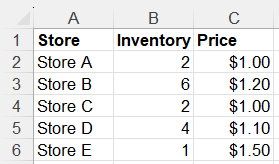
Hello, I have data in a table that has different amounts and prices. I would like to reference this data range to pull who has the largest inventory and then list that store's price. So...
- Jan 25, 2024
SDunning Using SORTBY()
• Formula used in cell E2 using Structured References:
=@SORTBY(Data[Price],Data[Inventory],-1)Or without using Tables:
=@SORTBY(C2:C6,B2:B6,-1)


SnowMan55
Jan 25, 2024Bronze Contributor
If one of those formulas works for your situation, that's great. But if you have multiple stores with the same inventory level, and need to see data for all of them, you can use the FILTER function; e.g.:
=LET( max_invty, MAX(B$2:B$7),
    FILTER(A$2:C$7, B$2:B$7 = max_invty)
)
In any case, you do not need to sort the data to get the desired result(s). (Yes, the formula can be written without using the LET function, but this makes the formula easy to understand.)
(And if you do not need data from all of the columns of the selected row(s), the CHOOSECOLS function in Excel 365/Excel for the web is useful.)