Forum Discussion

MathBarnes
Nov 01, 2023Copper Contributor
#REF! Error
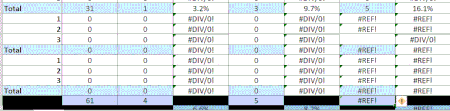
Hello, I have an Excel spreadsheet that I am using to collect data. I am using formulas and in certain cells the formulas are working but in others they are not- #REF!. I have clicked on the icon to...

MathBarnes
Nov 06, 2023Copper Contributor
Hello HansVogelaar
I deleted the top of the spreadsheet before uploading, but this information was not relevant to the collection of the data. I manually entered some numbers in some of the cells so that you could see that it wasn't calculating. No other worksheets are contained in the original workbook that has been deleted. My colleagues deleted some rows, but I thought that I corrected it when I replaced them and updated the formulas.
I deleted the top of the spreadsheet before uploading, but this information was not relevant to the collection of the data. I manually entered some numbers in some of the cells so that you could see that it wasn't calculating. No other worksheets are contained in the original workbook that has been deleted. My colleagues deleted some rows, but I thought that I corrected it when I replaced them and updated the formulas.

HansVogelaar
Nov 06, 2023MVP
Take N4. It contains the formula
=COUNTIFS(#REF!,1,#REF!,"a")
The first #REF! must originally have referred to a range elsewhere that contained 1 if a student needs to take the test.
And the second #REF! to a range that contained "a" if the student was absent.
These ranges are not present in the workbook, so I have no way to reconstruct the formula.
- MathBarnesNov 10, 2023Copper ContributorI think that was it! Thank you HansVogelaar for your help. Take care 🙂