Forum Discussion

Visualizing Year-over-Year Sales Data with Comparison Chart in Excel

This is no more elegant, even though it does manage to cram those three SORT(FILTER functions into a single HSTACK and do it all as "one formula" So I'll keep playing. Thank you for the opportunity.
=HSTACK(
SORT(FILTER($B$2:$C$19,$A$2:$A$19="Y-2022"),2,-1),
SORT(FILTER($B$2:$C$19,$A$2:$A$19="Y-2023"),2,-1),
SORT(FILTER($B$2:$C$19,$A$2:$A$19="Y-2024"),2,-1)
)
My suspicion is that the PIVOTBY function may be one that would work--maybe even with your raw data-- but that's only available currently in Beta.
Once again, all of the dynamic array functions are explained in this on-line resource.

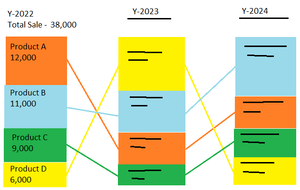
I comprehend your explanation regarding the data transformation process. However, I kindly request a chart or visualization that aligns with the example provided in my initial inquiry.
Thanks
- mathetesSep 09, 2024Gold Contributor
I am going to have to defer to some of the other folks in this forum. I do apologize, if it was the visualization in particular that you were seeking help with. I was obviously focusing exclusively on the data side of things.
I just don't do much, haven't for years, with graphic representation of data. In fact, I would have to play around with the options available under the Insert tool bar icons, at least as much as you would have to, if not more.
Given your awareness of what can be done with Power BI, I suspect you're way ahead of me.
But perhaps one of the other Excel forum volunteers can chime in with the appropriate method. Best wishes.