Forum Discussion

Elad_Magazanik
Nov 19, 2023Copper Contributor
Table transformation
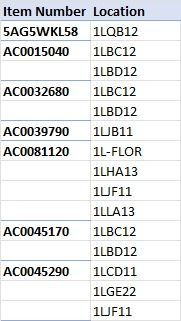
Hi, does anyone have any idea on how to transform this table: To this table: Many thanks, Elad


Lorenzo
Nov 19, 2023Silver Contributor
With Get & Transform aka Power Query in attached file. Done with the UI/Menus only
Alternative:
let
    Source = Excel.CurrentWorkbook(){[Name="Table"]}[Content],
    RemovedBlankLocation = Table.SelectRows(Source, each
        not List.IsEmpty(List.RemoveMatchingItems(Record.FieldValues(_), {"", null}))
    ),
    FilledDownItem = Table.FillDown(RemovedBlankLocation, {"Item Number"}),
    TranposedLocations = Table.Group(FilledDownItem, {"Item Number"},
        {
            {"LOCATIONS", each Table.Transpose(Table.SelectColumns(_, "Location")), type table},
            {"LOC_COUNT", Table.RowCount, Int64.Type}
        }
    ),
    ColumnsToExpand = List.Transform({1..List.Max(TranposedLocations[LOC_COUNT])},
        each "Column" & Text.From(_)
    ),
    RemovedLocCount = Table.RemoveColumns(TranposedLocations, {"LOC_COUNT"}),
    ExpandedLocations = Table.ExpandTableColumn(RemovedLocCount, "LOCATIONS",
        ColumnsToExpand, List.ReplaceValue(ColumnsToExpand, "Column", "Location ", Replacer.ReplaceText)
    )
in
    ExpandedLocations
Elad_Magazanik
Nov 19, 2023Copper Contributor
Thank you for the assistance.
- LorenzoNov 19, 2023Silver Contributor
You're welcome Elad_Magazanik
(Don't undertand why you marked as solution the post from peiyezhu that refers to another Data transformation using Power Query IMHO)
- PeterBartholomew1Nov 20, 2023Silver Contributor
Agreed. Both of your PQ solutions work perfectly, as does OliverScheurich's Lambda function solution.
My solution handles repeat items as separate objects.
- LorenzoNov 20, 2023Silver Contributor
I suspect @Elad_Magazanik has marked the "wrong" post by mistake...
