Forum Discussion

power query with relative data source not refreshing accurate data
- Aug 04, 2022
Hi Bridgett_B
I think you could continue using your CELL formulas, it's a clever idea.
To avoid the issue you describe when opening another workbook: Just add a cell reference to the formulas:
This way, it will always refer to that cell in this workbook, and not to another workbook.

Hi Bridgett_B
I assume there are a lot more steps in your query than the few that you described. To me it looks as if there might be some joins with other data, at least that is what I guess when I see that "Lookup"-column in your output.
If this is the case, than it could be normal that you still get some outputs, depending on the join that is used.
Could you provide please more information about what your query is going to do?

This particular query doesn't have any joins and it's is just data transformations that will create that lookup column and 2 calculated columns, accrued medicare and accrued SERS. That lookup field will be used in the Excel file itself (outside of PQ). This is the full code for the Query:
let
FolderPath = Excel.CurrentWorkbook(){[Name="FolderPath"]}[Content]{0}[Column1],
FileName = Excel.CurrentWorkbook(){[Name="FileName"]}[Content]{0}[Column1],
Source = Excel.Workbook(File.Contents(FolderPath & FileName), null, true),
WAGACT_Sheet = Source{[Item="WAGACT",Kind="Sheet"]}[Data],
#"Removed Top Rows" = Table.Skip(WAGACT_Sheet,2),
#"Promoted Headers" = Table.PromoteHeaders(#"Removed Top Rows", [PromoteAllScalars=true]),
#"Changed Type" = Table.TransformColumnTypes(#"Promoted Headers",{{"FND", type text}, {"FUNC", type text}, {"SCC", type text}, {"ACCRUED", type number}, {"MEDICARE", type number}, {"CONTRACT_REMAIN", type number}, {"CONTRACT_OBLI", type number}, {"OBJ", Int64.Type}}),
#"Removed Columns" = Table.RemoveColumns(#"Changed Type",{"SUBJ", "OPU", "IL", "JOB", "JBN", "CONTRACT_REMAIN", "CONTRACT_OBLI"}),
#"Changed Type1" = Table.TransformColumnTypes(#"Removed Columns",{{"FND", type text}, {"SCC", type text}, {"FUNC", type text}}),
#"Renamed Columns2" = Table.RenameColumns(#"Changed Type1",{{"MEDICARE", "MEDICARE_WAGACT"}}),
#"Added Custom Medicare" = Table.AddColumn(#"Renamed Columns2", "MEDICARE", each if [MEDICARE_WAGACT] = null then [ACCRUED] * .0145 else [MEDICARE_WAGACT]),
#"Reordered Columns" = Table.ReorderColumns(#"Added Custom Medicare",{"FND", "SCC", "FUNC", "OBJ", "EMP_ID", "EMP_NAME", "ACCRUED", "MEDICARE"}),
#"Inserted First Characters" = Table.AddColumn(#"Reordered Columns", "First Characters", each Text.Start(Text.From([FUNC], "en-US"), 2), type text),
#"Added Conditional Column1" = Table.AddColumn(#"Inserted First Characters", "First 2_Func", each if Text.StartsWith([First Characters], "19") then null else if Text.StartsWith([First Characters], "4") then null else [First Characters]),
#"Removed Columns2" = Table.RemoveColumns(#"Added Conditional Column1",{"First Characters"}),
#"Added Conditional Column" = Table.AddColumn(#"Removed Columns2", "19", each if Text.StartsWith([FUNC], "19") then [FUNC] else null),
#"Inserted First Characters1" = Table.AddColumn(#"Added Conditional Column", "First Characters.1", each Text.Start(Text.From([19], "en-US"), 3), type text),
#"Added Suffix1" = Table.TransformColumns(#"Inserted First Characters1", {{"First Characters.1", each _ & "0", type text}}),
#"Removed Columns1" = Table.RemoveColumns(#"Added Suffix1",{"19"}),
#"Added Suffix" = Table.TransformColumns(#"Removed Columns1", {{"First 2_Func", each _ & "00", type text}}),
#"Added Conditional Column4xxx" = Table.AddColumn(#"Added Suffix", "Custom", each if Text.StartsWith([FUNC], "4") then 4 else null),
#"Added Suffix2" = Table.TransformColumns(#"Added Conditional Column4xxx", {{"Custom", each Text.From(_, "en-US") & "000", type text}}),
#"Renamed Columns1" = Table.RenameColumns(#"Added Suffix2",{{"Custom", "4000"}}),
#"Added Custom SERS" = Table.AddColumn(#"Renamed Columns1", "Accrued SERS", each if [OBJ]>140 then [ACCRUED]* .14 else 0),
#"Rounded Off SERS" = Table.TransformColumns(#"Added Custom SERS",{{"Accrued SERS", each Number.Round(_, 2), type number}}),
#"Merged Columns" = Table.CombineColumns(#"Rounded Off SERS",{"First 2_Func", "First Characters.1", "4000"},Combiner.CombineTextByDelimiter("", QuoteStyle.None),"GFunction"),
#"Reordered Columns1" = Table.ReorderColumns(#"Merged Columns",{"FND", "SCC", "GFunction", "FUNC", "OBJ", "EMP_ID", "EMP_NAME", "ACCRUED", "MEDICARE", "Accrued SERS"}),
#"Removed Columns3" = Table.RemoveColumns(#"Reordered Columns1",{"FUNC"}),
#"Added Conditional Column2" = Table.AddColumn(#"Removed Columns3", "Accrued Medicare", each if [MEDICARE] = 0 then [ACCRUED]*.0145 else [MEDICARE]),
#"Removed Columns6" = Table.RemoveColumns(#"Added Conditional Column2",{"MEDICARE"}),
#"Reordered Columns3" = Table.ReorderColumns(#"Removed Columns6",{"FND", "SCC", "GFunction", "OBJ", "EMP_ID", "EMP_NAME", "ACCRUED", "Accrued Medicare", "Accrued SERS"}),
#"Renamed Columns" = Table.RenameColumns(#"Reordered Columns3",{{"ACCRUED", "Accrued Wages"}}),
#"Added Custom" = Table.AddColumn(#"Renamed Columns", "Fund", each Text.PadStart( [FND],3, "0")),
#"Reordered Columns2" = Table.ReorderColumns(#"Added Custom",{"Fund", "FND", "SCC", "GFunction", "OBJ", "EMP_ID", "EMP_NAME", "Accrued Wages", "Accrued Medicare", "Accrued SERS"}),
#"Removed Columns4" = Table.RemoveColumns(#"Reordered Columns2",{"FND"}),
#"Merged Columns1" = Table.CombineColumns(#"Removed Columns4",{"Fund", "GFunction"},Combiner.CombineTextByDelimiter("-", QuoteStyle.None),"Lookup"),
#"Grouped Rows" = Table.Group(#"Merged Columns1", {"Lookup"}, {{"Lookup.1", each _, type table}, {"Accrued Wages", each List.Sum([Accrued Wages]), type number}, {"Accrued Medicare", each List.Sum([Accrued Medicare]), type number}, {"Accrued SERS", each List.Sum([Accrued SERS]), type number}}),
#"Removed Columns5" = Table.RemoveColumns(#"Grouped Rows",{"Lookup.1"}),
#"Sorted Rows" = Table.Sort(#"Removed Columns5",{{"Lookup", Order.Ascending}}),
#"Changed Type2" = Table.TransformColumnTypes(#"Sorted Rows",{{"Accrued Wages", Int64.Type}, {"Accrued Medicare", Int64.Type}, {"Accrued SERS", Int64.Type}})
in
#"Changed Type2"
- Martin_WeissAug 03, 2022Bronze Contributor
Hi Bridgett_B
thanks for the details, so obviously my assumption was wrong.
Another thing:
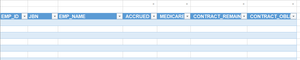
In your screenshot I see that you removed all data from your source table, but the empty rows still do exist. Did you try to delete the empty lines as well, so that only the header (and the first empty row) in the source table remains? And then refresh the query?
- Bridgett_BAug 03, 2022Copper ContributorYes and it will update correctly if I save the workbook after making changes to the table data. If I don't save the workbook, it won't refresh with accurate data.
I did finally figured out what it's doing. For examples sack lets say the workbook I have my query in is workbook A. My relative data sources in workbook A are setup on a designated "settings" tab and are various (CELL,"filename") formulas that are giving the file path and file name of the current workbook. When I open another Excel workbook, let's say workbook B, those formulas in the workbook A are updating to reflect the file name and directory path of workbook B. I think I'm going to have to either hard code that file name in, which could be problematic, or make it a parameter that the user can change/update on their own.- Martin_WeissAug 04, 2022Bronze Contributor
Hi Bridgett_B
I think you could continue using your CELL formulas, it's a clever idea.
To avoid the issue you describe when opening another workbook: Just add a cell reference to the formulas:
This way, it will always refer to that cell in this workbook, and not to another workbook.