Forum Discussion

JHTan
Sep 02, 2021Copper Contributor
Populating Data into a Table
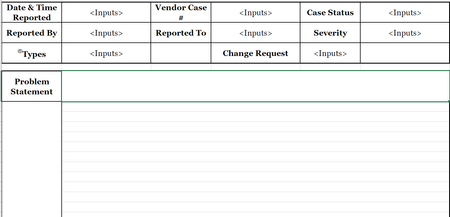
Hi everyone, What I would like to achieve is to populate the following inputs into another worksheet at a click of a button, and once it is populated, the inputs will be removed, waiting for the ...
- Sep 03, 2021
Try this out:
I just gave the form named ranges, pulled those into the database tab, then cleared the value. The .clear wasn't working with merged cells so I just blanked out the values.
Sub PopulateTable()

    Dim caseTracker_wb As Workbook: Set caseTracker_wb = Workbooks("Case Tracker v1.0.xlsm")
    Dim template_ws As Worksheet: Set template_ws = caseTracker_wb.Worksheets("Template")
    Dim database_ws As Worksheet: Set database_ws = caseTracker_wb.Worksheets("Database")

    Dim nextRow As Long
    nextRow = database_ws.Range("A" & Rows.Count).End(xlUp).Offset(1).Row

    Application.ScreenUpdating = False
    Application.DisplayAlerts = False

    ' Copy Form
    With database_ws
        .Cells(nextRow, 1).Value = Range("date_time").Value
        .Cells(nextRow, 2).Value = Range("vendornumber").Value
        .Cells(nextRow, 3).Value = Range("casestatus").Value
        .Cells(nextRow, 4).Value = Range("reportedby").Value
        .Cells(nextRow, 5).Value = Range("escalate").Value
        .Cells(nextRow, 6).Value = Range("severity").Value
        .Cells(nextRow, 7).Value = Range("types").Value
        .Cells(nextRow, 8).Value = Range("changerequest").Value
        .Cells(nextRow, 9).Value = Range("datetimeoccured").Value
        .Cells(nextRow, 10).Value = Range("caseno").Value
        .Cells(nextRow, 11).Value = Range("problemstatement").Value
        .Cells(nextRow, 12).Value = Range("Caseupdate").Value
        .Cells(nextRow, 13).Value = Range("closetime").Value
        .Cells(nextRow, 14).Value = Range("acknowledge").Value
    End With

    ' Clear Form
    Range("date_time").Value = ""
    Range("vendornumber").Value = ""
    Range("casestatus").Value = ""
    Range("reportedby").Value = ""
    Range("escalate").Value = ""
    Range("severity").Value = ""
    Range("types").Value = ""
    Range("changerequest").Value = ""
    Range("datetimeoccured").Value = ""
    Range("caseno").Value = ""
    Range("problemstatement").Value = ""
    Range("Caseupdate").Value = ""
    Range("closetime").Value = ""
    Range("acknowledge").Value = ""

    Application.ScreenUpdating = True
    Application.DisplayAlerts = True

End Sub

JHTan
Sep 02, 2021Copper Contributor

DKoontz
Sep 03, 2021Steel Contributor
Try this out:
I just gave the form named ranges, pulled those into the database tab, then cleared the value. The .clear wasn't working with merged cells so I just blanked out the values.
Sub PopulateTable()

    Dim caseTracker_wb As Workbook: Set caseTracker_wb = Workbooks("Case Tracker v1.0.xlsm")
    Dim template_ws As Worksheet: Set template_ws = caseTracker_wb.Worksheets("Template")
    Dim database_ws As Worksheet: Set database_ws = caseTracker_wb.Worksheets("Database")

    Dim nextRow As Long
    nextRow = database_ws.Range("A" & Rows.Count).End(xlUp).Offset(1).Row

    Application.ScreenUpdating = False
    Application.DisplayAlerts = False

    ' Copy Form
    With database_ws
        .Cells(nextRow, 1).Value = Range("date_time").Value
        .Cells(nextRow, 2).Value = Range("vendornumber").Value
        .Cells(nextRow, 3).Value = Range("casestatus").Value
        .Cells(nextRow, 4).Value = Range("reportedby").Value
        .Cells(nextRow, 5).Value = Range("escalate").Value
        .Cells(nextRow, 6).Value = Range("severity").Value
        .Cells(nextRow, 7).Value = Range("types").Value
        .Cells(nextRow, 8).Value = Range("changerequest").Value
        .Cells(nextRow, 9).Value = Range("datetimeoccured").Value
        .Cells(nextRow, 10).Value = Range("caseno").Value
        .Cells(nextRow, 11).Value = Range("problemstatement").Value
        .Cells(nextRow, 12).Value = Range("Caseupdate").Value
        .Cells(nextRow, 13).Value = Range("closetime").Value
        .Cells(nextRow, 14).Value = Range("acknowledge").Value
    End With

    ' Clear Form
    Range("date_time").Value = ""
    Range("vendornumber").Value = ""
    Range("casestatus").Value = ""
    Range("reportedby").Value = ""
    Range("escalate").Value = ""
    Range("severity").Value = ""
    Range("types").Value = ""
    Range("changerequest").Value = ""
    Range("datetimeoccured").Value = ""
    Range("caseno").Value = ""
    Range("problemstatement").Value = ""
    Range("Caseupdate").Value = ""
    Range("closetime").Value = ""
    Range("acknowledge").Value = ""

    Application.ScreenUpdating = True
    Application.DisplayAlerts = True

End Sub