Forum Discussion

Need Help - Conditional format keeps changing the number format when it should be CLEAR
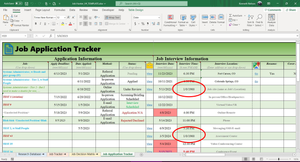

I'll be very interested in what others have to say, although I do notice that you've had nearly 60 views and no responses yet. That doesn't really surprise me, because what your images show is hard to make sense of.
If it's possible, without violating confidentiality or privacy, could you post a copy of the workbook on OneDrive or GoogleDrive, with a link here that grants access. Images alone often are insufficient to work with.....
That said, I have NEVER seen such an extensive list of Conditional Formatting rules, all applied to the same set of cells. And it would appear that you expect them all to be applied--i.e., you've not checked the "Stop if true" box on any, significantly not checked on the two rules that you appear to be concerned about. It might well be the case that one of the subsequent rules--there are so many!--is just overriding the ones you're asking about.

Regardless, I'll message you the workbook as I have done before with you, and therefore, do trust you (as always though, please do not distribute and/or sell for profit). If you find the issue, please share here for everyone to see and your "best response" credit.
Regarding the amount of rules. There are a lot rules and I really did try to have them as minimal as possible but there are a lot of things I want to happen.