Forum Discussion

How do I conditional format a column if certain value is present in a different column
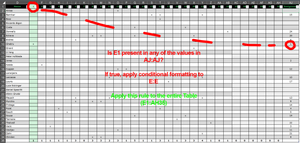

Let me clarify your doubts regarding table structural references inside conditional formatting dialog box. It might not seem like they work because you do not get to see Scouts[Assignment] after selecting the whole Assignment column from the actual table. The thing is it only doesn't display the name itself. It shows regular ranges reference but it works like a structural reference - meaning when your table expand the conditional formatting will folow and also expand to next cells. It is simply the way dialog boxes work in Excel - they are a bit buggy and hard to work with. I do not know if this is intended by Microsoft but they seem to be slowly working on updating the funcionalities of dialog boxes.
While the solution suggested by Chat GPT works fine, it could be also written like this:
=COUNTIF($AJ$2:$AJ$34, E$1)>=1
While writing a custom formatting rule you input a formula as if you wanted to write it for the first cell and then drag it down or right.
Kind regards