Forum Discussion

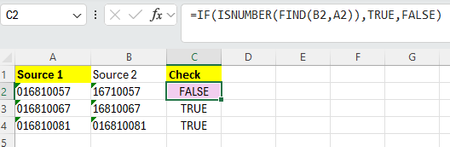
Formula to compare a number as text and a partial match?
- Jan 21, 2026
This is a text comparison with leading-zero tolerance, and you’re very close already.
What you want is to distinguish between:- Exact match
- Partial match caused by missing leading zero(s)
- No match
Because these are numbers stored as text, the safest approach is to normalize both values before comparing.
compare after padding with leading zeros
formula:
=IF(TEXT(A2,"00000000")=TEXT(B2,"00000000"),
"Match (or missing leading zero)",
"No match")
If you want 3 distinct results (Exact / Missing Zero / No Match)
formula:
=IF(A2=B2,
"Exact match",
IF(TEXT(A2,"00000000")=TEXT(B2,"00000000"),
"Match – missing leading zero",
"No match"))
If you want 3 distinct results (Exact / Missing Zero / No Match)
formula:
=IF(A2=B2,
"Exact match",
IF(TEXT(A2,"00000000")=TEXT(B2,"00000000"),
"Match – missing leading zero",
"No match"))
If lengths may vary (more flexible)
formula:
=IF(VALUE(A2)=VALUE(B2),
"Match (leading zero difference)",
"No match")
...Use the TEXT-padding method — I think it’s the safest and clearest
Avoid FIND for numeric identifiers
Treat IDs as text, not numbersMy answers are voluntary and without guarantee!
Hope this will help you.
Was the answer useful? Mark as best response and like it!
This will help all forum participants.


Your formula returns FALSE in C2 since the number 16710057 is not found within the string "016810057". It's not the missing zero thought the 7 in the third digit that results in FALSE.
No need to use IF( ..........., TRUE, FALSE) by the way.
=ISNUMBER(FIND(B2,A2))will work fine.