Forum Discussion

Formula result not showing in cell
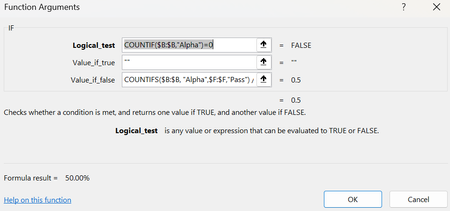
 Feb 02, 2026
HelloLoganc,
Yes, the formula is correct according to Microsoft documentation.
Official Microsoft documentation for the IF function:
https://support.microsoft.com/en-us/office/if-function-69aed7c9-4e8a-4755-a9bc-aa8bbff73be2The IF function syntax is:
=IF(logical_test, value_if_true, value_if_false)Your formula correctly:
Uses COUNTIF and COUNTIFS, which return numeric values
Divides the counts to return a decimal value (0.5)
Relies on cell formatting to display the decimal as a percentage (50%)The reason you see 50% in the Formula Arguments dialog but 0% in the worksheet cell is not because the formula is wrong. It is due to Excel’s handling of empty strings ("") in numeric or percentage-formatted cells. When IF returns an empty string in one branch, Excel can temporarily coerce that result to zero or fail to refresh the displayed value until recalculation.
This behavior is consistent with Excel’s documented behavior and is a known display/calculation quirk, not a formula error.
A commonly recommended workaround for numeric formulas is to return NA() instead of an empty string, for example:
=IF(COUNTIF($B:$B,"Alpha")=0, NA(), COUNTIFS($B:$B,"Alpha",$F:$F,"Pass") / COUNTIF($B:$B,"Alpha"))
This avoids empty-string coercion and ensures the cell displays the correct percentage consistently.
In summary, the formula logic is valid and compliant with Microsoft documentation; the issue is related to Excel’s calculation/display behavior rather than the formula itself.

Did you set decimal places correctly after formatting the cell as percentage? Can you please share few sample data and show your desired result?
 LogancFeb 02, 2026Copper Contributor
I am trying to use one formula to input into B15 so that box automatically fills with the pass/fail rate of the cadets in that flight. My code (should) go down B, find the amount of times "alpha" shows up, then divide the amount that pass by the total times it was found. Here it should be 50%. Column F includes a formula that sees if the respective D column is less than or equal to the E column, and if it is, it would mark it as a pass, otherwise a fail. The decimal places are set to 2, and the cell is formatted as a percentage.