Forum Discussion

Excel PivotTable in Browser
 Jan 23, 2022
Try this:
In the slicer settings, uncheck 'show items deleted from the data source' (para-phrasing).
If the above option is not available (depends on your excel version), check 'hide items with no data'
The formatting changes to indicate 'no data' for that filter. In your case, Admin.
I checked by changing one PM Designation to Admin. Refreshed. It works fine!
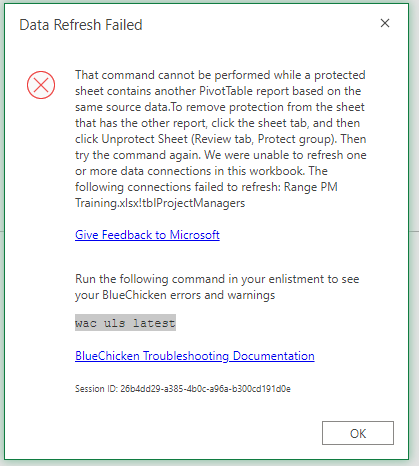
I didn't see anything about BlueChicken on the file you shared. Even when refreshing data on protected sheets. Check with your work place, if it has anything to do with cloud servers and network sharing.
You may contact your administrator or check the link below, if you find answers.
https://www.c5insight.com/Resources/Blog/tabid/148/entryid/837/troubleshooting-office-web-apps-ssl-issues.aspx

- mtarlerJan 27, 2022Silver Contributor
gkayne NowshadAhmed Just so you know you aren't crazy, I got a reference to BlueChicken also:
the link in the bottom to usc-excel.officeapps.live.com/... is that BlueChicken Troubleshooting Documentation link...
But in my case the file does NOT open/load
- NowshadAhmedJan 28, 2022Iron ContributorI was able to open the file, refresh data, and work on it as well. However, I didn't see the BlueChicken error or any notice about that. Perhaps both you and gkayne have subscriptions to microsoft office apps?
- mtarlerJan 28, 2022Silver ContributorI'm sorry, I may have confused things. that error I show wasn't from the file in this thread. i assumed this thread was resolved. I was just searching for references to 'BlueChicken' and saying that gkayne isn't the only one to get an error that refers to BlueChicken
