Forum Discussion

ameyad09
Feb 25, 2024Copper Contributor
Date Field showing as text due to the '-' hyphens present in the field.
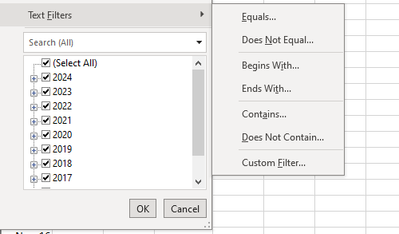
So ,I have a date field in date format (Jan-17) and when I filter on that field it keeps showing Text Filters as below instead of date Requirement is to get Date Filters as below : ...

JKPieterse
Feb 26, 2024Silver Contributor
That typically happens when one or more cells do not contain a date (or have not been interpreted by Excel as being a valid date). To find them, select the column in question and press the F5 key on your keyboard (GoTo). Click the Special button. Select "Constants" (or "Formulas" if the cells contain formulas!) and only check the "Text" box. Now you can hit the Del key to empty those cells and you should be able to filter on dates.

ameyad09
Feb 26, 2024Copper Contributor
I tried this,however getting message No cells were found for the entire column.
Is there any way to handle the hyphens to show as date using any formula?
Thanks.
Is there any way to handle the hyphens to show as date using any formula?
Thanks.