Forum Discussion

Bielalve
Aug 09, 2022Copper Contributor
Count different texts
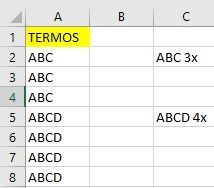
Basically I'm working only with column A, where I have several different terms, but they repeat in different amounts. I need to know how many times each of these terms appeared in column A, is there ...
 Aug 09, 2022
Hi Bielalve
Recentily Microsoft upgrade to Excel's formula language to support https://support.microsoft.com/en-us/office/dynamic-array-formulas-and-spilled-array-behavior-205c6b06-03ba-4151-89a1-87a7eb36e531.
Now you cold use this simple way to do this
=UNIQUE(A2:A1812) & " " &COUNTIF(A2:A1812;UNIQUE(A2:A1812)) & "x"or if you need filter nulable results try this other form
=LET(
           rangecells;A2:A1812;
           uniqList; UNIQUE(rangecells);
           filteredList; FILTER(uniqList;uniqList<>"");
           return; filteredList & " " &COUNTIF(rangecells;filteredList)  & "x";
 return
)
Hope it help you

OliverScheurich
Aug 09, 2022Gold Contributor
=COUNT(SEARCH(", "&C3&", ",", "&$A$2:$A$18&", "))You can try this formula. Enter the formula with ctrl+shift+enter since you don't work with Office365 or 2021.

Bielalve
Aug 09, 2022Copper Contributor
For some reason I can't make the formula work, it just returns #name
I'm using Office365 at home
- OliverScheurichAug 10, 2022Gold Contributor
Do you work with the english version of Excel? Otherwise you would have to translate the formula. You can open the attached file and the result is shown with the formula translated into your language.