Forum Discussion

VOwens1
Apr 24, 2026Copper Contributor
"Clear Filter From" Option is Never Available
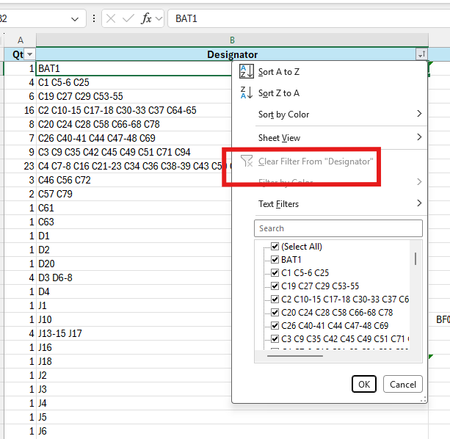
Once a column is filtered, the option to remove that filter just from that column is always greyed out in my Excel (Microsoft 365, v2604, Build 19929.20090). I have seen multiple references advising...
- Apr 24, 2026
not saying you don't have a problem but the image you show doesn't look like there is any filter applied and hence the 'clear' option is grayed out. Basically the drop down butting is showing a sort icon NOT a filter icon. The list shows (Select All) as checked (i.e. none are filtered out). Maybe you could apply a filter and show us what it looks like when a filter is applied.


Riny_van_Eekelen
Apr 24, 2026Platinum Contributor
It's exactly what m_tarler suggested. Filter the column and then the 'Clear Filter....' button will be enabled.