Forum Discussion

Chart from dynamic array challenge
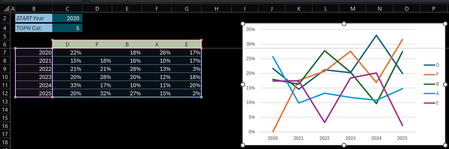

I keep coming back to this post over and over again and also saw your cross-post on Q&A with no answers.
I guess I just didn't understand what you were trying to demonstrate. Now I downloaded your "Workaround" file, and the first thing I note when I change the TOPN number in the UI tab is that nothing happens. Went to the DATA tab and saw that the pivot table was not set to "Auto Refresh". Most likely because your Excel doesn't support it.
Switched on Auto Refresh, changed the TOPN number again in the UI tab. Then this happens:
It seems the UI tab is protected. Removed the protection and everything refreshes automatically upon changing the TOPN number in the UI tab.
- LorenzoFeb 02, 2026Silver Contributor
It seems I didn't do a decent job trying to demo. what I don't understand. So simplified the sample where we only play with the TOPN criteria and the number of Years is always 6 (2020...2025). Below are a few scenario & results
TEST #1
Set TOPN: 5
B6: =TOPN_Pivoted
Chart data range: =UI!$C$6:$G$12
Switch Row/Column if necessary
Horizontal Axis Labels (keep defaults: 1...6)- Set TOPN: 4 // Result: 5 series on Chart
Set TOPN: 4
Chart data range: =UI!$C$6:$F$12
Horizontal Axis Labels (keep defaults: 1...6)- Set TOPN: 5 then 6 // Result: 7 series on Chart
TEST #2
Set TOPN: 5
B6: =TRANSPOSE( TOPN_Pivoted )
Chart data range: =UI!$B$7:$H$11
Switch Row/Column if necessary
Horizontal Axis Labels (keep defaults: 1...6)- Set TOPN: 6 then 2
// Result: 2 series on Chart (1st is wrong). Only 5 labels on xAxis
Q: Due to false blank in C8???
- Set TOPN: 5 // Result: Back to 6 labels on xAxis
- Set TOPN: 1 then 2
// Result: 2 series on Chart (1st is wrong). Only 5 labels on xAxis
Q: Again, the false blank in C8???
- Set TOPN: 6 // Result: Back to 6 labels on xAxis
NOTE: With the exception of TOPN = 2 this seems to work better when array is transposed / series on rows (???)
TEST #3
Set TOPN: 5
B6: =FIXED_FALSE_BLANK
Chart data range: =UI!$C$6:$G$12
Switch Row/Column if necessary
Horizontal Axis Labels (keep defaults: 1...6)- - Set TOPN: 2 then 5 > 3 > 2 > 6 > 4 > 1 > 2 > 6 > 2 > 4 > 5
// Result: Works much better with 0 instead of false blank
TEST #4
Set TOPN: 5
B6: =TRANSPOSE( FIXED_FALSE_BLANK )
Chart data range: =UI!$B$7:$H$11
Switch Row/Column if necessary
Horizontal Axis Labels (keep defaults: 1...6)- - Set TOPN: 1 then > 2 > 6 > 4 > 3 > 5 > 1 > 2 > 6 > 2 > 4 > 5
// Result: Again, works much better with 0 instead of false blank
TEST #5
Set TOPN: 5
B6: =FIXED_FALSE_BLANK
Chart data range: =UI!$C$6:$G$12
Switch Row/Column if necessary
Edit Horizontal Axis Labels: =UI!$B$7:$B$12- Set TOPN: 3 // Result: 4 series (1st blank) + No Year on xAxis...
TEST #6
Set TOPN: 5
B6: =TRANSPOSE( FIXED_FALSE_BLANK )
Chart data range: =UI!$B$7:$H$11
Switch Row/Column if necessary
Edit Horizontal Axis Labels: =UI!$C$6:$H$6- Set TOPN: 4 // Result: 5 series (1st blank) + No Year on xAxis…
Same question again: Am I doing something wrong? / Am I missing something? / Is it mission impossible to get the series & the xAxis to update together dynamically when the array resizes (number of years may also vary under real-world conditions)?
- Riny_van_EekelenFeb 03, 2026Platinum Contributor
I believe the problem lies in the fact that you don't include the years column in the dynamic array. With TOPN 5 it just gives you 5 series. When you then add the year numbers (non-dynamic) as the x-axis labels it breaks.
What I did is write a formula in UI, B6 that references TOPN_Pivoted and adds a proper date column to it. I'm sure you can think of a more elegant way to achieve this.
=HSTACK(VSTACK("Year",BYROW(TAKE(TOPN_Pivoted,-6,1),LAMBDA(y,DATE(y,1,1)))),DROP(TOPN_Pivoted,,1))Create a chart from that array and it will come out like this:
You can see that the Year column with proper dates is automatically picked up as a row header.
If you don't transform the year numbers into proper date values you'll get this:
It includes "Year" as just another number series. All series are stacked on top of each other and only the last one is visible.
Switch Rows/Columns and you'll get this:
The blue line at the top is the series "Year" with values 2020 to 2025, being far out of touch with the other series which all lay in the bottom of the chart.
Not sure if this helps. Kindly ignore if it doesn't.
