Forum Discussion

Adding number in the same table
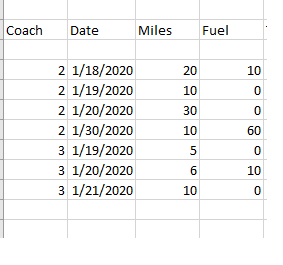

Tia Rojas I think your trouble might be in understanding that in Excel the "Formula" in the cell is hidden and used to show the RESULT of that formula. So if you type a formula like =A1+B1 in a cell you don't see that text but instead the result of A1+B1.
So if you paste the formula I gave you in the columns where you need those answers they will show the results you want. Try it out, I think you'll catch on quickly.

tarlerI tried your formulas and I am getting the incorrect result because is not doing the addition that I need:
Please take a look at your formula and the result that I get. What I need to get is in red
To get the correct result in the top picture I need something like this:
If D5 <> 0 then f5 = 0 and $h$1=0 <--- h1 is a holder and need to change to do an addition
If D5 = 0 then F5 = C5 + $h$1 and $h$1= C5
If D5 <> 0 then G5 = C5 + F4 (I will have put a 0 on F4 to initialize)
if D5 = 0 Then G5 = 0