Forum Discussion

Windows 11 Printer Issue - DYMO LW450 DUO is not installing correctly/entirely
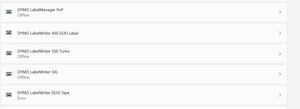

I ordered and tried the print server when I had this issue by January, without success. So this now does the job?
In some reviews I read about better using a third party printserver rather than expensive Dymo with outdated hardware. Would a Silex printserver also do the job?

 MichekCSep 29, 2022Copper Contributor
StevieC-D_UK no same issue but now in the website of Dymo, you have a banner which says that they know and they search for a solution… But since July 🤣🤣🤣
 StevieC-D_UKSep 29, 2022Copper Contributor
Any news on this being fixed? We are almost 10 months in to this thread now.
- DutchDude68Aug 25, 2022Copper ContributorCould't agree more on the Software Kevin ! And good to know the Dymo Server works as well 👍😃,
 KevinWAug 25, 2022Brass Contributor
I take the supported / not supported matrix on the Dymo pages with a pinch of salt ! The 450 Duo does definitely work with the Dymo Print Server in W10 and W11, also using the Dymo Label 8.7.4 software (which I much prefer to the later Dymo Connect offering). Dymo Label is supposedly not supported either...... but does indeed work perfectly 🙂
Best regards,
Kevin
- DutchDude68Aug 25, 2022Copper ContributorO yeah, forgot to say : a Raspberry Pi you can get for $30-$35 or find a used one for much less probably (would be my choice 🙂
- DutchDude68Aug 25, 2022Copper ContributorI had a Raspberry Pi 2 laying around and searched the I-net on making a printserver.
I didn't have Linux experience before and installed the Pi for the first time (saying that it isn't difficult to do 🙂 and used and combined the info on the pages.
I got the Dymo 450 Duo Drivers installed on the Rasp.Pi and the Print Server is functioning perfectly on both Windows 10 & Windows 11. There was a catch though : Windows 10/11 did find the Duo Label & Tape networkprinters when you used Add Printer BUT the Dymo Label software didn't see them ( neither when using the networktool in Dymo software) !
So what i did was using the IP networkaddress of the Rasp. Pi in Windows Explorer Network and then selected the TAPE and later the LABEL printer and let Windows install the drivers as local Printers. That way the Dymo Tape and Label Printer do show up in the Software (as a local Printer) .
So here a the pages i used for the info :
https://circuitdigest.com/microcontroller-projects/raspberry-pi-print-server
https://www.tomshardware.com/how-to/raspberry-pi-print-server
https://johnathan.org/configure-a-raspberry-pi-as-a-print-server-for-dymo-label-printers/
I still hope Dymo finds a solution for this problem but as i saw that also the Dymo Print Server Device is NOT supported in Windows 11 my guess would be that their software will not be able to overcome this problem and that they maybe will be creating a successor for the 450 DUO (e.g. 550DUO 🙂 ???) which will have a network/wireless connection - Thomas_ModlibaAug 22, 2022Copper Contributor
I set-up al lot of printservers, mainly the HP Jetdirect in the past, the setting of ports were all the same als described in Dymo manual, so I'll give it a try and return in case it fails.
I had CUPS running on a Pogoplug in the past an setup the Duo successfully, used it with Windows 8.1, as then you simply add two Samba network printers. Unfortunaltely I killed the Linux by removing libc6 package when trying to resolve apt dependency issues. As this took quite some tine to get it running and needs to maintain yet another device I prefer to go with print server, but as mentioned I prefer more recent hardware that I can use for something else also.
 drol343Aug 22, 2022Copper ContributorThat is good and hope this fix is longterm. But $100+ to fix an issue that Dymo should fix is nuts to me.
- KevinWAug 22, 2022Brass Contributor
The whole saga with the Dymo Duo and W11 has been confusing ! But to clarify, yes, by getting a Dymo Print Server S0929090 and adding that to your Ethernet network, you acquire a networked USB port to which you can plug in the Dymo Duo 450 label printer. In the config setup you designate two ports to the label and tape printers and off you go. It utilises the normal label and tape printer drivers and I have now had running normally for a few weeks with no issues.
Best regards,
Kevin
- KevinWAug 22, 2022Brass Contributor
I can't vouch for other print servers, but the Dymo one does work perfectly, provided you set it up correctly per the instructions (someone posted a link to these in an earlier post some weeks ago). If a third party device has similar port setting fields, it is likely it should also work, but there's only really one way to find out !
Best regards,
Kevin