Forum Discussion

R-Squared for Nonlinear Trendlines in Graphs
 Oct 01, 2021
jmt188.... Note that I just made some significant edits to my previous response in order to improve(?) the explanation. If you had trouble following the explanation previously, you might want to reread the edited response.

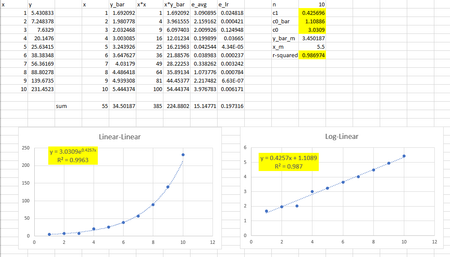
JoeUser2004 Please see the attached file. The y-values include random noise in an effort to ensure r-squared values less than unity. That said, all equations should update each time the worksheet is modified. Thanks for the help.
jmt188.... Note that I just made some significant edits to my previous response in order to improve(?) the explanation. If you had trouble following the explanation previously, you might want to reread the edited response.
- jmt188Oct 01, 2021Copper Contributor
JoeUser2004 Thank you for identifying the cause of the observed discrepancy between my calculation and the values presented in the graph. I was not aware that Excel had modified the r-squared value associated with nonlinear trendlines to the Pearson Coefficient as calculated in linear-linear space. As noted in your reply, the Pearson Coefficient and Coefficient of Determination are equivalent in the absence of a data transformation. This equivalence, coupled with the modified definition in Excel resulted in differences when reopening older worksheets. Thank you again for clarifying the issue as well as providing some useful recommendations going forward.
- JoeUser2004Oct 01, 2021Bronze Contributor
jmt188 wrote: ``I was not aware that Excel had modified the r-squared value associated with nonlinear trendlines to the Pearson Coefficient as calculated in linear-linear space. As noted in your reply, the Pearson Coefficient and Coefficient of Determination are equivalent in the absence of a data transformation.``
Just to clarify, I am not saying that the trendline R^2 calculates the square of the Pearson correlation coefficient per se, instead of the CoD.
My use of RSQ was a simplification, relying on the equivalence that you mention, which applies to your examples.
We know that LINEST R^2 calculates the CoD. See the help page.
And according to my comments in another discussion (click here), I had concluded that the trendline R^2 also calculates the CoD.
I believe there have been two changes ("corrections") to the trendline R^2 calculation in Office 365 Excel and more recent versions.
1. The trendline R^2 has adopted the different CoD calculation that LINEST uses when a zero intercept is specified. Again, see the LINEST help page.
Thus, the trendline R^2 and LINEST R^2 will agree when a zero intercept is specified.
2. The trendline R^2 calculation is based on the correlation between the original y and the estimated y generated by the trendline formula, which might not be linear.
In contrast, using your chart #1 trendline for example, the Excel 2010 trendline R^2 is based on the correlation between the original y and the estimated ln(y) = a*x + ln(b) instead of the estimated y = b*exp(a*x).
(As does the LINEST R^2 (CoD), since it cannot know that the linear relationship between Y and X is derived from a nonlinear relationship.)
It is #2 that is relevant to the difference that you observed in the two charts, not the use of RSQ instead of CoD.