Forum Discussion

Excel
Jun 24, 2022Iron Contributor
Question related to combine a column with duplicated numbers into one cell containing several rows
Hello Everyone, I would like to combine all duplicated Job numbers into one cell, but have the part numbers and description relevant to the job number in a single cell next to it. Is this possible...
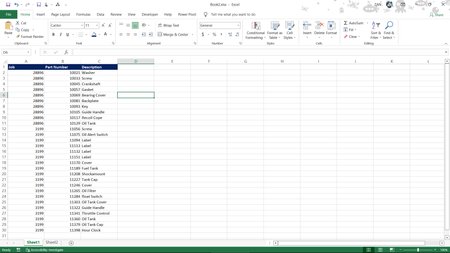
- Jun 24, 2022
Well...
Until the MergedColumn step (included) this can be done with the UI so I suspect you're interested by step CombinedPartsAsLines that - in the way I did it - can't be done with the UI only
1/ Group the table by column [Job], Operation = All rows
2/ Go to the Advanced Editor. The Group Rows step says:
=Table.Group(MergedColumns, {"Job"}, {{"Parts", each _, type table [Job=nullable number, PartDescription=text]}})3/ Replace it with:
=Table.Group(MergedColumns, {"Job"}, {{"Parts", each Text.Combine([PartDescription], "#(lf)"), type text}})4/ Close the Advanced Editor (keep your changes)
What #3 does: take all values of column [PartDescription] and contenate them with a LineFeed char.
( the , type text at the end isn't mandatory)

Lorenzo
Jun 24, 2022Silver Contributor

Excel
Jun 24, 2022Iron Contributor
Now, i am very crystal clear understand in Power Query.
Thank you so much sir.
Thank you so much sir.