Forum Discussion

Question about categorizing transactions from bank statement in EXCEL
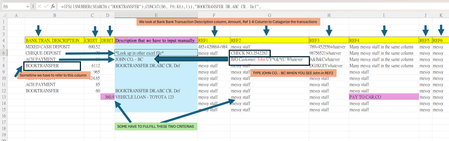
 May 23, 2024
=IFNA(
IFNA(
IFNA(
IFNA(
IFNA(
IFNA(
IFNA(INDEX(Filling!$A$2:$A$11,MATCH(1,ISNUMBER(SEARCH(Filling!$C$2:$C$11,$K2))*(Filling!$B$2:$B$11=$F2),0)),
INDEX(Filling!$A$2:$A$11,MATCH(TRUE,ISNUMBER(SEARCH(Filling!$C$2:$C$11,$H2)),0))
),
INDEX(Filling!$A$2:$A$11,MATCH(TRUE,ISNUMBER(SEARCH(Filling!$C$2:$C$11,$I2)),0))
),
INDEX(Filling!$A$2:$A$11,MATCH(TRUE,ISNUMBER(SEARCH(Filling!$C$2:$C$11,$J2)),0))
),
INDEX(Filling!$A$2:$A$11,MATCH(TRUE,ISNUMBER(SEARCH(Filling!$C$2:$C$11,$K2)),0))
),
INDEX(Filling!$A$2:$A$11,MATCH(TRUE,ISNUMBER(SEARCH(Filling!$C$2:$C$11,$L2)),0))
),
INDEX(Filling!$A$2:$A$11,MATCH(TRUE,ISNUMBER(SEARCH(Filling!$C$2:$C$11,$M2)),0))
),INDEX(Filling!$A$2:$A$11,MATCH(TRUE,ISNUMBER(SEARCH(Filling!$C$2:$C$11,$D2)),0)))In the formula in the bank statement file i've adapted the ranges from e.g. Filling!$A$2:$A$200 to Filling!$A$2:$A$11 because there is only criteria up to row 11 in the Filling sheet.
In addition the INDEX and MATCH highlighted in red is now evaluated in the first step of the whole nested formula. Before it was evaluated in the last step (but only if all other INDEX and MATCH formulas returned an error).
I understand that the formula i suggested earlier works well and i'm glad it does but can't explain how it works at the moment.
I will study the new formula in detail later but do not understand it well.
It seems that the look-up array of match functions becomes (Tabelle2!$B$2:$B$21=D6)*ISNUMBER(SEARCH(Tabelle2!$C$2:$C$21,$F6))
which column D is matched with all columns.
I have tested if I enter something N/A in the B column, and some value should be matched in F-K column, the function works perfectly, but I am not sure of the mechanism of it.
I would be pleased if you could explain how it works.
I apologize for bothering you too much.
I am looking forward to the Bank statement - returns 0.xlsx solution.
Again, thank you very much for your hard work and patience.
=IFNA(
IFNA(
IFNA(
IFNA(
IFNA(
IFNA(
IFNA(
INDEX(Filling!$A$2:$A$11,MATCH(1,ISNUMBER(SEARCH(Filling!$C$2:$C$11,$K2))*(Filling!$B$2:$B$11=$F2),0)),
INDEX(Filling!$A$2:$A$11,MATCH(TRUE,ISNUMBER(SEARCH(Filling!$C$2:$C$11,$H2)),0))
),
INDEX(Filling!$A$2:$A$11,MATCH(TRUE,ISNUMBER(SEARCH(Filling!$C$2:$C$11,$I2)),0))
),
INDEX(Filling!$A$2:$A$11,MATCH(TRUE,ISNUMBER(SEARCH(Filling!$C$2:$C$11,$J2)),0))
),
INDEX(Filling!$A$2:$A$11,MATCH(TRUE,ISNUMBER(SEARCH(Filling!$C$2:$C$11,$K2)),0))
),
INDEX(Filling!$A$2:$A$11,MATCH(TRUE,ISNUMBER(SEARCH(Filling!$C$2:$C$11,$L2)),0))
),
INDEX(Filling!$A$2:$A$11,MATCH(TRUE,ISNUMBER(SEARCH(Filling!$C$2:$C$11,$M2)),0))
),INDEX(Filling!$A$2:$A$11,MATCH(TRUE,ISNUMBER(SEARCH(Filling!$C$2:$C$11,$D2)),0)))
In the formula in the bank statement file i've adapted the ranges from e.g. Filling!$A$2:$A$200 to Filling!$A$2:$A$11 because there is only criteria up to row 11 in the Filling sheet.
In addition the INDEX and MATCH highlighted in red is now evaluated in the first step of the whole nested formula. Before it was evaluated in the last step (but only if all other INDEX and MATCH formulas returned an error).
I understand that the formula i suggested earlier works well and i'm glad it does but can't explain how it works at the moment.
- liveupdatesecureteam05Oct 21, 2026Occasional Reader
Thank you for the detailed explanation. I believe a rule-table approach would be the best solution for my bookkeeping needs, especially since I have hundreds of rules involving different columns and multiple conditions.
I would appreciate your guidance in developing a practical Excel template that can automate the categorization process and make the rules easier to manage and update.
If you don't mind, I would be happy to show you a sample of my current Excel workbook so we can discuss the requirements in more detail. Perhaps we could work together privately to develop a solution that fits my specific needs.
Thank you for your time and assistance. I look forward to hearing from you.
- udonloverMay 23, 2024Copper Contributor
Thank you very much for your kind support!
I have tried the formula in the office's spreadsheet, and it works perfectly.
I will keep in mind that the range for searching the separate worksheet should be limited to the rows inputted something, thank you for reminding me.
You move INDEX(Filling!$A$2:$A$11,MATCH(1,ISNUMBER(SEARCH(Filling!$C$2:$C$11,$K2))*(Filling!$B$2:$B$11=$F2),0)), to the beginning, this makes sure that "debit" and "REF4" column will be matched in the first place, so it won't be obstructed be other functions. Am I correct?
I will look into the details later to have a better understanding to this formula.
Once again, thank you very much for your super-patient and sincere support. I have learned a lot from it, and it facilitates my office work. Thanks a lot.