Forum Discussion

Put a specific word in a cell based on the word in another cell
- May 02, 2026
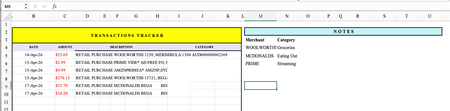
You absolutely can do this without Microsoft 365, without array formulas, and without stress.
In cell D2, put this formula:
=IF(ISNUMBER(SEARCH("WOOLWORTHS",C2)),"Groceries",IF(ISNUMBER(SEARCH("MCDONALDS",C2)),"Eating Out",IF(ISNUMBER(SEARCH("PRIME",C2)),"Streaming","")))
Then drag down column D.
How to add more rules
Just replace the final "" with another IF(ISNUMBER(SEARCH("WORD",C2)),"Category", and close with "" at the end.
Example with 5 rules:
=IF(ISNUMBER(SEARCH("WOOLWORTHS",C2)),"Groceries",IF(ISNUMBER(SEARCH("MCDONALDS",C2)),"Eating Out",IF(ISNUMBER(SEARCH("PRIME",C2)),"Streaming",IF(ISNUMBER(SEARCH("AMAZON",C2)),"Shopping",""))))
friendly tip…
If a transaction doesn't match any word, the cell will stay blank. Just manually type the category for those few — or add another rule if you see a pattern.
My answers are voluntary and without guarantee!
Hope this will help you.
Was the answer useful? Mark as best response and like it!
This will help all forum participants.


I only consider using 365, preferably insider beta.
My strategy is to search for the presence of each merchant within the description, returning the corresponding category where successful. Because there is the possibility that more than one merchant could be present on a single row, concatenation reduces the categories to a scalar. This reverse lookup is given by
Worksheet formula
= REVLOOKUPλ(description, merchant, category)

where

REVLOOKUPλ = LAMBDA(descr, merch, cat,
    MAP(descr, LAMBDA(d,
        CONCAT(
            MAP(merch, cat, LAMBDA(m, c,
                XLOOKUP(m, d, c, "", 3))
            )
        )
    ))
);