Forum Discussion

Put a specific word in a cell based on the word in another cell
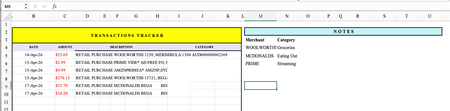
- May 02, 2026
You absolutely can do this without Microsoft 365, without array formulas, and without stress.
In cell D2, put this formula:
=IF(ISNUMBER(SEARCH("WOOLWORTHS",C2)),"Groceries",IF(ISNUMBER(SEARCH("MCDONALDS",C2)),"Eating Out",IF(ISNUMBER(SEARCH("PRIME",C2)),"Streaming","")))
Then drag down column D.
How to add more rules
Just replace the final "" with another IF(ISNUMBER(SEARCH("WORD",C2)),"Category", and close with "" at the end.
Example with 5 rules:
=IF(ISNUMBER(SEARCH("WOOLWORTHS",C2)),"Groceries",IF(ISNUMBER(SEARCH("MCDONALDS",C2)),"Eating Out",IF(ISNUMBER(SEARCH("PRIME",C2)),"Streaming",IF(ISNUMBER(SEARCH("AMAZON",C2)),"Shopping",""))))
friendly tip…
If a transaction doesn't match any word, the cell will stay blank. Just manually type the category for those few — or add another rule if you see a pattern.
My answers are voluntary and without guarantee!
Hope this will help you.
Was the answer useful? Mark as best response and like it!
This will help all forum participants.


I have fleshed out some possible solutions in this workbook on Microsoft OneDrive: 2026-05-02 JJM categorize expenditures by keywords.xlsx The _Info worksheet contains explanations and references.
 jojomartin845Jun 08, 2026Copper Contributor
Hello, thank you so much for your worksheet! I did end up going with another contributor who used IF(ISNUMBER(SEARCH
I did like the idea of your solution 2 because it was very cleanly laid out, but I couldn't get it to work. I may revisit your solutions if the other stopped working, but I wanted to personally thank you because you put so much effort into responding.