Forum Discussion

Put a specific word in a cell based on the word in another cell
- May 02, 2026
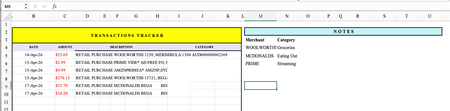
You absolutely can do this without Microsoft 365, without array formulas, and without stress.
In cell D2, put this formula:
=IF(ISNUMBER(SEARCH("WOOLWORTHS",C2)),"Groceries",IF(ISNUMBER(SEARCH("MCDONALDS",C2)),"Eating Out",IF(ISNUMBER(SEARCH("PRIME",C2)),"Streaming","")))
Then drag down column D.
How to add more rules
Just replace the final "" with another IF(ISNUMBER(SEARCH("WORD",C2)),"Category", and close with "" at the end.
Example with 5 rules:
=IF(ISNUMBER(SEARCH("WOOLWORTHS",C2)),"Groceries",IF(ISNUMBER(SEARCH("MCDONALDS",C2)),"Eating Out",IF(ISNUMBER(SEARCH("PRIME",C2)),"Streaming",IF(ISNUMBER(SEARCH("AMAZON",C2)),"Shopping",""))))
friendly tip…
If a transaction doesn't match any word, the cell will stay blank. Just manually type the category for those few — or add another rule if you see a pattern.
My answers are voluntary and without guarantee!
Hope this will help you.
Was the answer useful? Mark as best response and like it!
This will help all forum participants.

You absolutely can do this without Microsoft 365, without array formulas, and without stress.
In cell D2, put this formula:
=IF(ISNUMBER(SEARCH("WOOLWORTHS",C2)),"Groceries",IF(ISNUMBER(SEARCH("MCDONALDS",C2)),"Eating Out",IF(ISNUMBER(SEARCH("PRIME",C2)),"Streaming","")))
Then drag down column D.
How to add more rules
Just replace the final "" with another IF(ISNUMBER(SEARCH("WORD",C2)),"Category", and close with "" at the end.
Example with 5 rules:
=IF(ISNUMBER(SEARCH("WOOLWORTHS",C2)),"Groceries",IF(ISNUMBER(SEARCH("MCDONALDS",C2)),"Eating Out",IF(ISNUMBER(SEARCH("PRIME",C2)),"Streaming",IF(ISNUMBER(SEARCH("AMAZON",C2)),"Shopping",""))))
friendly tip…
If a transaction doesn't match any word, the cell will stay blank. Just manually type the category for those few — or add another rule if you see a pattern.
My answers are voluntary and without guarantee!
Hope this will help you.
Was the answer useful? Mark as best response and like it!
This will help all forum participants.
 jojomartin845Jun 08, 2026Copper Contributor
Thank you! This ended up being the easiest solution. I have heard if I end up using a lot of rules the spreadsheet may be slow to load, so I will see. But even if I can just get the main ones in, still awesome! Appreciate it! I also think an extra ) is needed at the very end of the formula for each new rule, but excel corrected me each time so I have yet to test it. Thank you for giving me a solution that wasn't using xlookup.