Forum Discussion

Put a specific word in a cell based on the word in another cell
- May 02, 2026
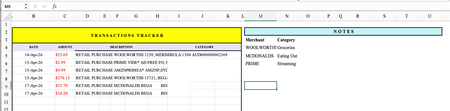
You absolutely can do this without Microsoft 365, without array formulas, and without stress.
In cell D2, put this formula:
=IF(ISNUMBER(SEARCH("WOOLWORTHS",C2)),"Groceries",IF(ISNUMBER(SEARCH("MCDONALDS",C2)),"Eating Out",IF(ISNUMBER(SEARCH("PRIME",C2)),"Streaming","")))
Then drag down column D.
How to add more rules
Just replace the final "" with another IF(ISNUMBER(SEARCH("WORD",C2)),"Category", and close with "" at the end.
Example with 5 rules:
=IF(ISNUMBER(SEARCH("WOOLWORTHS",C2)),"Groceries",IF(ISNUMBER(SEARCH("MCDONALDS",C2)),"Eating Out",IF(ISNUMBER(SEARCH("PRIME",C2)),"Streaming",IF(ISNUMBER(SEARCH("AMAZON",C2)),"Shopping",""))))
friendly tip…
If a transaction doesn't match any word, the cell will stay blank. Just manually type the category for those few — or add another rule if you see a pattern.
My answers are voluntary and without guarantee!
Hope this will help you.
Was the answer useful? Mark as best response and like it!
This will help all forum participants.


How about a lookup table of keywords and categories, by using formulas like VLOOKUP or INDEX/MATCH combined with SEARCH:
https://support.microsoft.com/en-us/office/vlookup-function-0bbc8083-26fe-4963-8ab8-93a18ad188a1
https://exceljet.net/formulas/categorize-text-with-keywords
https://www.extendoffice.com/documents/excel/7144-excel-categorize-bank-transactions.html