Forum Discussion

TMcIlroy
Oct 07, 2020Copper Contributor
Pulling data from one tab to another- with an editable parameter
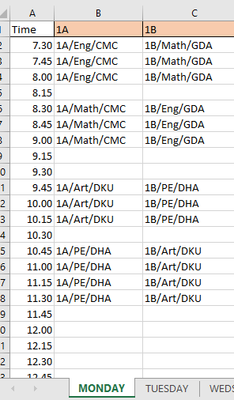
Hello, I am organising a school timetable on excel. Days of the week are on tabs. With classes on columns. Lessons in rows. Each cell has data entered like this 1A/Eng/CMC (class code/Subject...

TMcIlroy
Oct 07, 2020Copper Contributor
Rajesh_Sinha Ok- Ive added some images of current and goal. Hope that helps!

Rajesh_Sinha
Oct 07, 2020Iron Contributor
TMcIlroy ,,
This solves the issue:
Results:
How it works:
- In Master sheet from B5 to next the Column Name must similar to Sheet Name like Monday, Tuesday.
- Array (CSE) formula in Master Sheet's cell B6:
{=IFERROR(INDEX(INDIRECT(B$5&"!$B$2:$B$8"),SMALL(IF(COUNTIF(INDIRECT(B$5&"!$B$2:$B$8"),"*"&$C$1&"*"),ROW(INDIRECT(B$5&"!$B$2:$C$8"))-MIN(ROW(INDIRECT(B$5&"!$B$2:$C$8")))+1),ROW($A1)),COLUMN($A1)),"")}
- Finish formula with Ctrl+Shift+Enter, and fill across.
- Next you need to adjust cell references in this part, before you change the criteria in cell C1.
For GDA change this :
INDEX(INDIRECT(B$5&"!$C$2:$C$8"),SMALL(IF(COUNTIF(INDIRECT(B$5&"!$C$2:$C$8"),"*"&$C$1&"*")
Since GDA records are in Column C.
You may use IF to check criteria in cell C1, and accordingly for TRUE and FALSE use required data range but it will be complicated, so better adjust cell references as I've suggested above , every time you change criteria.