Forum Discussion

Pulling data fields from reports (based on date) and compiling them into another tab.
 Feb 23, 2023
Hello,
instead of an IF command i've tried this formula
=IFERROR(INDEX(CoverPage!$I$51:$I$53,MATCH([@Ring],CoverPage!$C$51:$C$53,0)),"")
in cell B3 of sheet "Compiled Info" and it seems to return the expected result. The formula is spilled down within the dynamic table. However because of the merged cells in sheet "CoverPage" i find it difficult to help with this task.

Hello,
instead of an IF command i've tried this formula
=IFERROR(INDEX(CoverPage!$I$51:$I$53,MATCH([@Ring],CoverPage!$C$51:$C$53,0)),"")
in cell B3 of sheet "Compiled Info" and it seems to return the expected result. The formula is spilled down within the dynamic table. However because of the merged cells in sheet "CoverPage" i find it difficult to help with this task.
- jdogg29Mar 01, 2023Brass ContributorI put that formula for a few fields and it populates on the combined tab. The only issue is that it does not save it there. When I delete the info, it deletes from the combined tab. This report is going to be held on sharepoint and edited by multiple people. so when the next shift comes in, they will edit the cover page and put in their own info. The result that I really need is that when they delete off of the cover page, it is still recorded on the combined tab. There will never be duplicated rings, so once a ring # is recorded, it will not need to change. Is there any way of doing this?
- OliverScheurichMar 02, 2023Gold Contributor
I would make a copy of the combined tab (sheet "Compiled Info") and then copy and paste only the values in the copied sheet before the report is edited by the next shift. This way the formulas remain in the combined tab and the data in the copy of the combined sheet doesn't change.
The only other possible solution i can imagine is as shown in a simplified example in the attached file. Let's say the ring # are entered in range A2:A5 and the additional info in ranges B2:B5 and C2:C5. You can try what happens if you enter e.g. ring # 17 in cell A2 and additional info in B2 and C2. This could return the expected result but would be difficult to do with VBA. In addition if a ring # is entered twice along with it's additional info by mistake the original data would be overwritten.
- jdogg29Mar 10, 2023Brass ContributorThank you so much for the continued help with this.
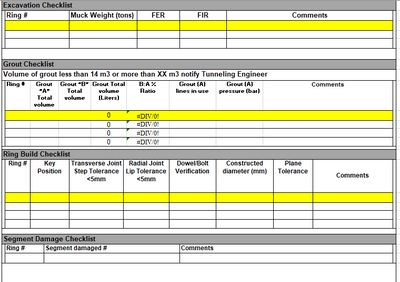
Is there any way that there can be an unique ID for x6 and the date, so that when a person picks their shift the info is tied to that shift? somehow these people want this done the other way around, that they fill the info into Excavation Checklist tab and that gets populated onto the cover page. Is this way possible at all? or is there just a way that if they fill into onto the combined tab it will to over to the cover page.
- jdogg29Mar 01, 2023Brass ContributorThanks so much for this, it seems to work. I just need to do it for all the other cells. Sorry for the delay in response!