Forum Discussion

Pulling data fields from reports (based on date) and compiling them into another tab.
 Feb 23, 2023
Hello,
instead of an IF command i've tried this formula
=IFERROR(INDEX(CoverPage!$I$51:$I$53,MATCH([@Ring],CoverPage!$C$51:$C$53,0)),"")
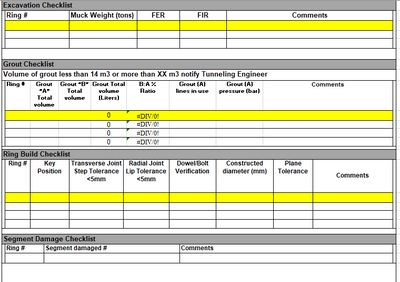
in cell B3 of sheet "Compiled Info" and it seems to return the expected result. The formula is spilled down within the dynamic table. However because of the merged cells in sheet "CoverPage" i find it difficult to help with this task.

The Cover Page includes the TODAY() function. When data is entered into the various areas and then moved to the Compiled Info sheet, would the cover page eventually be cleared out so a different day's data could be entered?
 jdogg29Feb 21, 2023Brass ContributorHello, yes every shift the sheet is cleared or overwritten. I updated the original post to include that the data for most sections needs to be pulled from the ring number. the only fields that need to be pulled by the date are these ones in the shift information tab.
- Patrick2788Feb 21, 2023Silver ContributorI think this changes the solution from array-based formulas to VBA. The Cover Page would serve as an input form with a submit button to write the data to the compiled sheet. After the data is written to the Compiled Sheet it would be cleared from the Cover Page.
- jdogg29Feb 21, 2023Brass Contributor
I have been playing around with this and actually for one field working on the compiled tab by using this formula - =IF('CoverPage'!$C$51=[@Ring],'CoverPage'!MuckWeight,"")
But the issue is that when the ring number on the cover page changes, it just disappears from the compiled tab. how can I get these to stay as a record? See my updated file attached please. Also, thank you both so much for the help with this!