Forum Discussion

Profit Formula Challenge
- Dec 31, 2020
Don't forget that Twifoo intended the challenge to be an examination of the use of advanced array methods available within traditional Excel. The dislike of CSE is understandable but is simply a by-product of the user-interface design.
As I noted earlier, I had trained myself to commit all formulas with CSE but I would have preferred not to need it. For some reason my proposal to reverse the conventions, that is to use CSE to introduce the additional implicit intersection step and use Enter to allow the calculation to proceed as a simple array operation was not well-received 🙂
I share the views of SergeiBaklan and Twifoo in that I see no need to avoid {1,-1,1,-1} as an array constant on the grounds that the notation is similar to the CSE notation. The array constant is an important element of array calculation. They need to be used with care, not because they are arrays, but because they are constants. If there exists a possibility that they may change, a named variable would be more appropriate than a constant embedded within a formula.

I hope my response has not put others off contributing traditional spreadsheet solutions!
The solutions I am exploring are not available within most Excel versions and would not suit many users.
In the new modification to my solution, I have made it more targeted and eliminated a number
of intermediate variables. The image below shows the spilt range output from a single formula
= LET(
  Crosstab, SUMIFS(Amounts, Types, listTypes, Branches, HdrBranches),
  OperatingProfit, MMULT( TRANSPOSE(SignCashFlow), Crosstab ),
  Profits, IF(OperatingProfit > 0, OperatingProfit),
  Losses, IF(OperatingProfit<= 0, -OperatingProfit),

   KeyMetrics,HSTACK("",
     SUM(OperatingProfit), COUNT(Profits), COUNT(Losses), MAX(Profits)+MAX(Losses)),
   ExtremeValues, HSTACK("", MAX(Profits), MIN(Profits), -MIN(Losses), -MAX(Losses)),
   AssociatedBranches, XLOOKUP( ExtremeValues, OperatingProfit, HdrBranches),
   VSTACK("", Headings1, KeyMetrics, Headings2, AssociatedBranches, ExtremeValues) )
I have chosen to show formulas using Charles Williams's HSTACK and VSTACK functions because the intent is clearer, but CHOOSE with the correctly oriented index arrays will achieve the same result.

Although you indirectly admitted that your solution is inherently inapplicable to most Excel users, it nonetheless behooves me to commend you for your tenacious pursuit thereof! Before I ultimately divulge my solutions, I deem it prudent to meanwhile anticipate possible solutions from SergeiBaklan, and other Excel Experts from this Community.
- SergeiBaklanOct 19, 2020Diamond Contributor
Twifoo , sorry, perhaps some later, bit overloaded with current project and answer here only to have some rest and if that takes not more than 5 minutes. Your task looks quite interesting, but I'm very far from accounting world and for me to understand what "Combined bottom line of All Branches" means will take significant time.
PeterBartholomew1 solutions looks interesting, but as I avoided CSE I try to avoid any macros and third-party add-ins. Charles suggests great additions, however I'd prefer to wait till the same will be out of the box.
- PeterBartholomew1Oct 21, 2020Silver Contributor
Like you, I avoid add-ins especially when sharing ideas with others. Charles Williams work I have enjoyed, though, and I hope some of his ideas eventually get adopted by Microsoft. I have found the array manipulation offered in the form of slicing and stacking, ACCUMULATE for accountancy corkscrew problems and some of the Regular Expression formulas to be particularly effective. I did include a working version of the present formula based on CHOOSE, because people tend to be unimpressed when they open a workbook that refuses to calculate.
= LET( Crosstab, SUMIFS(Amounts, Types, listTypes, Branches, HdrBranches), OperatingProfit, MMULT( TRANSPOSE(SignCashFlow), Crosstab ), Profits, IF(OperatingProfit > 0, OperatingProfit), Losses, IF(OperatingProfit<= 0, -OperatingProfit), KeyMetrics, CHOOSE({1,2,3,4}, SUM(OperatingProfit), COUNT(Profits), COUNT(Losses), MAX(Profits)+MAX(Losses)), ExtremeValues, CHOOSE({1,2,3,4}, MAX(Profits), MIN(Profits), - MIN(Losses), -MAX(Losses)), AssociatedBranches, XLOOKUP( ExtremeValues, OperatingProfit, HdrBranches), CHOOSE({1;2;3;4;5}, Headings1, KeyMetrics, Headings2, AssociatedBranches, ExtremeValues) )- SergeiBaklanOct 22, 2020Diamond Contributor
So, we are almost in sync.
- TwifooOct 19, 2020Silver Contributor
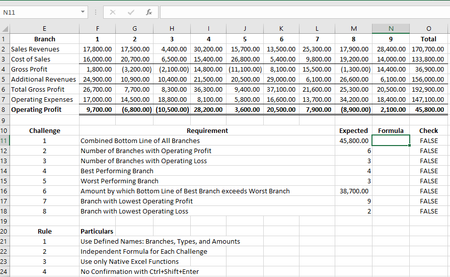
Don't worry, I empathize with you. Bottom Line simple means the final amount, which refers to the values in the row for Operating Profit. Thus, Combined Bottom Line of All Branches refers to the value for Total Operating Profit, which is 45,800.00. I trust that I have somehow clarified your doubts as to the terms used in this formula challenge. By the way, Accounting is the language of business! It is only through Accounting that business information can be communicated to the users thereof.
- SergeiBaklanOct 22, 2020Diamond Contributor
Twifoo , thank you for the clarification. Yes, sure , accounting is the language of business, but English terms are not always understandable if your business uses another language.
