Forum Discussion

Sergey_SN
Sep 23, 2023Copper Contributor
Problem with displaying styles in excel
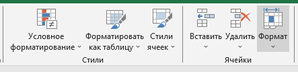
I lost the constant display of styles, now I always have to click on the button to see them. the way I see it now but I need to see it like this how i can fix this? it looks like the p...
- Sep 23, 2023
Home tab is overloaded and in Russian icon names are much wider compare to English. Expanded cell styles requires lot of space which is not enough in Russian version.
Above is just my guess after I played with both.

SergeiBaklan
Sep 23, 2023Diamond Contributor
As workaround you may create new tab and new group on ribbon, add to it Cell Styles, don't forget to untick Minimize Gallery from the right click menu on Cell Styles here
Result will be like
Doing above you may give any names to new tab/group and place it on ribbon on most suitable for you place. Since this group will be relatively empty you may add other icons to work with cells to keep them in one place. Depends on what do you use more often.

Sergey_SN
Sep 23, 2023Copper Contributor
This is a good idea, thank you for this solution)
- SergeiBaklanSep 23, 2023Diamond Contributor
Sergey_SN , you are welcome