Forum Discussion

Problem with displaying styles in excel
- Sep 23, 2023
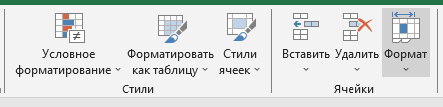
Home tab is overloaded and in Russian icon names are much wider compare to English. Expanded cell styles requires lot of space which is not enough in Russian version.
Above is just my guess after I played with both.


No, there is a free space on the right side, but if i change the language in the program, everything is shown correctly (but when i back, i have trouble again)

You can report the problem from within Excel: select File > Send a Frown (or the equivalent in your language, of course)
- Sergey_SNSep 23, 2023Copper Contributor
all my exel files has this problem) i dont understand whats happened
@Hans Vogelaar- SergeiBaklanSep 23, 2023Diamond Contributor
Home tab is overloaded and in Russian icon names are much wider compare to English. Expanded cell styles requires lot of space which is not enough in Russian version.
Above is just my guess after I played with both.
- Sergey_SNSep 23, 2023Copper Contributor
Thank you so much for your reply, that solved my problem!
some time after installation, excel adds the add-in section to the shortcut bar (not immediately) and this makes the styles window become a button