Forum Discussion

Moysoul
May 15, 2024Copper Contributor
Printout macros problem
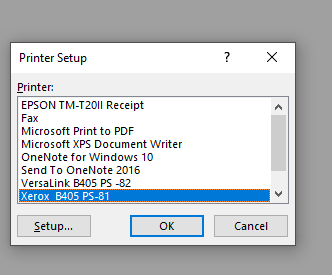
hello friends, I'm facing an issue when i record an macros to printout sheet using this code Application.Dialogs(xlDialogPrinterSetup).Show
ActiveWindow.SelectedSheets.PrintOut Copies:=1, ...
- May 15, 2024
Let's try a different approach 🙂
Sub PrintWithPrinterSetup()
    Dim printerDialog As Variant

    ' Show printer setup dialog
    Set printerDialog = Application.Dialogs(xlDialogPrinterSetup)
    If Not printerDialog.Show Then
        MsgBox "Printing canceled by user.", vbExclamation
        Exit Sub
    End If

    ' Print only if the user didn't cancel
    ActiveWindow.SelectedSheets.PrintOut Copies:=1, Collate:=True, _
        IgnorePrintAreas:=False
End Sub
If that doesn't work either, please add more detailed information such as Excel version, operating system, storage medium, etc.
If possible the file (without sensitive data).

Moysoul
May 15, 2024Copper Contributor
still printout if i press cancel bro 😞 NikolinoDE

NikolinoDE
May 15, 2024Platinum Contributor
Let's try a different approach 🙂
Sub PrintWithPrinterSetup()
    Dim printerDialog As Variant

    ' Show printer setup dialog
    Set printerDialog = Application.Dialogs(xlDialogPrinterSetup)
    If Not printerDialog.Show Then
        MsgBox "Printing canceled by user.", vbExclamation
        Exit Sub
    End If

    ' Print only if the user didn't cancel
    ActiveWindow.SelectedSheets.PrintOut Copies:=1, Collate:=True, _
        IgnorePrintAreas:=False
End Sub
If that doesn't work either, please add more detailed information such as Excel version, operating system, storage medium, etc.
If possible the file (without sensitive data).
- MoysoulMay 15, 2024Copper ContributorThanks it's working fine, appreciate your support bro 🙂