Forum Discussion

Printout macros problem
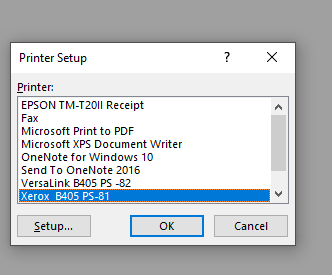
- May 15, 2024
Let's try a different approach 🙂
Sub PrintWithPrinterSetup()
    Dim printerDialog As Variant

    ' Show printer setup dialog
    Set printerDialog = Application.Dialogs(xlDialogPrinterSetup)
    If Not printerDialog.Show Then
        MsgBox "Printing canceled by user.", vbExclamation
        Exit Sub
    End If

    ' Print only if the user didn't cancel
    ActiveWindow.SelectedSheets.PrintOut Copies:=1, Collate:=True, _
        IgnorePrintAreas:=False
End Sub
If that doesn't work either, please add more detailed information such as Excel version, operating system, storage medium, etc.
If possible the file (without sensitive data).

The macro does not include a check to see if the user canceled the dialog. To address this, you can maybe modify your code to handle the case where the user cancels the printer setup dialog.
Here is a modified VBA Code you can try (Code is untested, please backup your file first):
Sub PrintWithPrinterSetup()
    On Error Resume Next
    Application.Dialogs(xlDialogPrinterSetup).Show
    If Err.Number <> 0 Then
        MsgBox "Printing canceled by user.", vbExclamation
        Err.Clear
        Exit Sub
    End If
    On Error GoTo 0

    ActiveWindow.SelectedSheets.PrintOut Copies:=1, Collate:=True, _
        IgnorePrintAreas:=False
End Sub
Hope this will help you.

still printout if i press cancel bro 😞 NikolinoDE
- NikolinoDEMay 15, 2024Platinum Contributor
Let's try a different approach 🙂
Sub PrintWithPrinterSetup()
    Dim printerDialog As Variant

    ' Show printer setup dialog
    Set printerDialog = Application.Dialogs(xlDialogPrinterSetup)
    If Not printerDialog.Show Then
        MsgBox "Printing canceled by user.", vbExclamation
        Exit Sub
    End If

    ' Print only if the user didn't cancel
    ActiveWindow.SelectedSheets.PrintOut Copies:=1, Collate:=True, _
        IgnorePrintAreas:=False
End Sub
If that doesn't work either, please add more detailed information such as Excel version, operating system, storage medium, etc.
If possible the file (without sensitive data).- MoysoulMay 15, 2024Copper ContributorThanks it's working fine, appreciate your support bro 🙂