Forum Discussion

spr1nger
Jul 13, 2022Copper Contributor
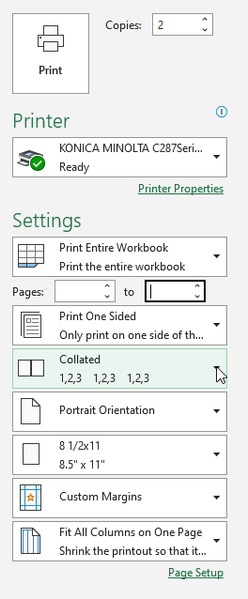
Printing more than 1 copy of Entire Workbook, will not collate
I have a workbook of 12 tabs. When I try to print multiple copies of the entire workbook, the output is not collating, even though I have it set to collated. I've checked my printer settings, prefe...

spr1nger
Jul 14, 2022Copper Contributor
Thank you for your reply. Unfortunately it doesn't address my issue. I'm using Microsoft 365 Apps for Enterprise. Specifically, Microsoft® Excel® for Microsoft 365 MSO.
My issue is that when printing multiple copies of an entire workbook, it isn't printing collated, even though I have the collate option selected. In other words, if I'm printing 10 copies of a Workbook, I'm getting 10 copies of page 1, then 10 copies of pg 2, and so on. I want it to print the Workbook, page 1 through, in this case pg 12, 10 times, so that I don't have to manually put the pages in to book order. Does that make sense?
My issue is that when printing multiple copies of an entire workbook, it isn't printing collated, even though I have the collate option selected. In other words, if I'm printing 10 copies of a Workbook, I'm getting 10 copies of page 1, then 10 copies of pg 2, and so on. I want it to print the Workbook, page 1 through, in this case pg 12, 10 times, so that I don't have to manually put the pages in to book order. Does that make sense?
