Forum Discussion

Print Preview Not Matching Original Document
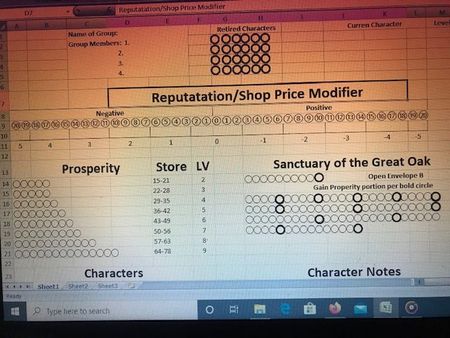

Another idea: but first, an observation: you're not really using Excel for the kinds of things that Excel excels in; rather, you're using it more because of its rows and columns, i.e., its layout features. Yet it's precisely its layout that is messing you up.
So my suggestion: use Microsoft Word instead. You can insert a table in Word, where that's appropriate. You can insert graphic features....
If I had been tasked with creating the kind of scoring sheet you're trying to create here, I would have started with Word rather than Excel.... But I might also have gone for more of a complete graphics program. Come to think of it: you could create this as a PowerPoint slide.

mathetes
I stated this in the comment below with an answer given (wondering if it is the same reason) but I wanted to state it here also for you. I was able to get a copy of Microsoft word to work on my computer (2007) and started doing this. It is doing the same exact thing on word.
- mathetesMay 18, 2020Gold Contributor
I actually think Power Point gives more flexibility when it comes to positioning things. Give it a try