Forum Discussion

Prevent Excel From Converting to Legacy Array
 Jul 04, 2023
Thank you for this. Unfortunately index / match formulas also result in the same loss of functionality. That being said I did find a work around this morning. I essentially used a helper column on another sheet that needed to be created anyways so I added the helper column as part of that data.
I do appreciate the confirmation that preventing the conversion to a legacy array formula is not possible.
Thank you again!

In Excel 365, there is not a direct way to prevent the conversion to a legacy array formula. Legacy array formulas are automatically created when saving a workbook in an older Excel file format (such as .xls) or when using certain compatibility settings.
However, you can try a workaround to achieve the same result without using an array formula. Instead of using a single array formula, you can use a combination of SUMIFS and INDEX/MATCH functions.
Here is an example:
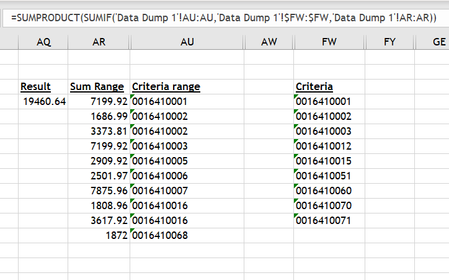
- Assuming the data range in 'Data Dump 1'!AU:AU contains the values to match against, 'Data Dump 1'!$FW:$FW contains the criteria values, and 'Data Dump 1'!AR:AR contains the values to sum, you can use the following formula:
=SUMIFS('Data Dump 1'!AR:AR, 'Data Dump 1'!AU:AU, INDEX('Data Dump 1'!$FW:$FW, MATCH(1, ('Data Dump 1'!AU:AU<>"") * ('Data Dump 1'!AU:AU='Data Dump 1'!$FW:$FW), 0)))
- This formula uses INDEX/MATCH to retrieve the matching values in 'Data Dump 1'!$FW:$FW based on the criteria in 'Data Dump 1'!AU:AU. Then, SUMIFS is used to sum the corresponding values in 'Data Dump 1'!AR:AR based on the matched criteria.
By using this approach, you should be able to avoid using an array formula while still achieving the desired result. Please note that you may need to adjust the cell references and range sizes based on your specific data layout.
Although this workaround may be more computationally intensive than the array formula, it should still provide a reasonable performance compared to using multiple SUMIF formulas for each FW value. The texts and steps were created by the AI.
Hope this will help you.
- HaldurenJul 04, 2023Copper Contributor
Thank you for this. Unfortunately index / match formulas also result in the same loss of functionality. That being said I did find a work around this morning. I essentially used a helper column on another sheet that needed to be created anyways so I added the helper column as part of that data.
I do appreciate the confirmation that preventing the conversion to a legacy array formula is not possible.
Thank you again!