Forum Discussion

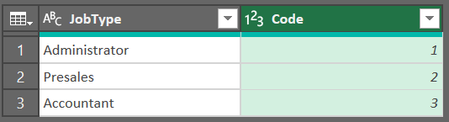
Power Query: Using value in first table to retrieve one from a column in another table
- Dec 31, 2023
Mohamed_Hanno That would be a LeftOuter merge I believe. Please see attached.

Thanks Riny_van_Eekelen for your reply but the reason I wanted to do it in M code was that my actual requirements is much more sophisticated. The first table has repeated values in the code column and a third column with values something like this:
I want to get the highest value that matches the Job Type and add it to the second table which means that the relation is many to many and that I need to use some function that retrieves the max value. Can this be done without coding?
My apology for not explaining all this the first time but I thought it would be simpler to take it one step at a time.

"I want to do it in M code"
I presume you mean that you want to use Power Query.
"Can this be done without coding?"
Well, Power Query automatically creates M code for you if you are not dealing with very complex matters. So, yes you can achieve quite a lot without coding. Just push the correct buttons in the correct order.
And as far as your question is concerned, no I don't get it. Contrary to your idea to take it step-by-step, it's better to give the complete picture from the start. How does the raw data look like and how should the end result look like? Do not overly simplify the matter. And perhaps you don't need PQ at all. Then, it's important to know your Excel version and platform (PC or Mac).
- Mohamed_HannoJan 01, 2024Copper Contributor
To answer your questions:
- I need to use Power Query because I am getting the data from a company database and need to maintain a dynamic link to update the data.
- I am using Excel 365 on Windows
- Regarding the data:
This is the first table that includes the codes that I want to add to the second table based on two criteria (highest code value, matching Job Type:This is the second table where I want to add the highest codes wherever the Job Title matches:
- Riny_van_EekelenJan 01, 2024Platinum Contributor
Mohamed_Hanno Like in the attached perhaps?
- Mohamed_HannoJan 01, 2024Copper Contributor
Almost but I need the second table to be also loaded to the query. The two tables are coming from two separate Excel files that I need to have in the Query editor.
And what if I want to use multiple criteria as in using both Job Type and Title to match the highest code is this possible with the grouping method you used. Here is the double criteria data:
First Table
JobType Title Code Admin Manager 1 Admin Manager 2 Admin Manager 3 Admin Officer 4 Admin Officer 5 Admin Officer 6 Presales Manager 4 Presales Manager 5 Presales Manager 6 Presales Senior Engineer 7 Presales Senior Engineer 8 Presales Senior Engineer 9 Presales Engineer 10 Presales Engineer 11 Accountant Manager 5 Accountant Manager 6 Accountant Manager 7 Accountant Senior Acountant 8 Accountant Senior Acountant 9 Accountant Senior Acountant 10 Second Table
JobType Title Date Admin Manager 31-Dec-23 Presales Senior Engineer 01-Jan-24 Presales Manager 02-Jan-24 Presales Senior Engineer 03-Jan-24 Accountant Manager 04-Jan-24 Accountant Senior Acountant 05-Jan-24 Admin Officer 06-Jan-24 Presales Senior Engineer 07-Jan-24