Forum Discussion

Power Query List
- Jul 05, 2023
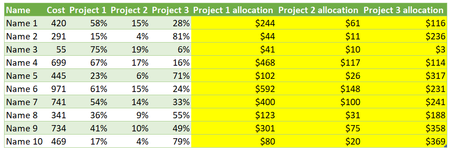
DON_DCS Perhaps the attached example helps you on your way. It's a rather simplistic, step by step approach that probably can be made more effective, but then it would most likely be more difficult to follow.
The query unpivots the data first. Then it adds the calculation of the allocation for each row and adds a column to hold allocation column names.
Then it pivots only the columns relevant to the allocations and merges it with the original source, based on the project name. Expand the merged column based on the dynamic list of allocation column names created earlier.
See if you can follow the step and apply them to your own file. If not come back here.


Still try to understand the TypeForColumnsToUpdate and why did you put a false after that and type table TypeForColumnsToUpdate after Table.AddColumn 🙂

On a different case Table.FromRows was slower than Table.Tranpose(Table.FromColumns()). Tried the following approaches on a table of 10K rows x 200 columns to update:
AddedTable = Table.AddColumn(ChangedTypes, "TEMP_TABLE",
    (r)=> Table.Transpose(
            Table.FromList(
                List.Transform(Record.ToList(Record.SelectFields(r,ColumnsToUpdate)), each _ * r[Cost]),
                Splitter.SplitByNothing()
            ),
            ColumnsToUpdate
        ),
    type table
),
AddedTable = Table.AddColumn(ChangedTypes, "TEMP_TABLE",
(r)=> Table.Transpose(
Table.FromColumns(
{List.Transform(Record.ToList(Record.SelectFields(r,ColumnsToUpdate)), each _ * r[Cost])}
),
ColumnsToUpdate
),
type table
),Always difficult to measure precisely but the above options appeared to be slightly faster. After buffering the list of columns to update the difference was obvious:
With Table.FromRows, avg time to refresh: 00:00:10
With above options, avg time to refresh: 00:00:06
- LorenzoAug 01, 2023Silver Contributor
Tried a few other approaches. The following did not appear to be faster with 10K rows. With 50K rows it's 3 to 4 secs (avg.) faster than the other options
let
    Source = Excel.CurrentWorkbook(){[Name="SourceTable"]}[Content],
    ColumnsToUpdate = List.Buffer(
        List.Select(Table.ColumnNames(Source), (c)=> Text.StartsWith(c, "P"))
    ),
    ChangedTypes = Table.TransformColumnTypes(Source,
        {{"Name", type text}, {"Division", type text}, {"Cost", type number}} &
        List.Transform(ColumnsToUpdate, each {_,type number})
    ),
    AddedRecord = Table.AddColumn(ChangedTypes, "TEMP_RECORD",
        (r)=> Record.FromList(
            List.Transform(ColumnsToUpdate, (c)=> r[Cost]*Record.Field(r,c)),
            ColumnsToUpdate
        ),
        type record
    ),
    RemovedColumns = Table.RemoveColumns(AddedRecord, ColumnsToUpdate),
    Expanded = Table.ExpandRecordColumn(RemovedColumns, "TEMP_RECORD", ColumnsToUpdate),
    RestoredTypes = Value.ReplaceType(Expanded, Value.Type(ChangedTypes))
in
    RestoredTypes
FYI:
- I disabled Query Option "Allow data previews to download in the background"
- Disabling the PQ Firewall (Query Option "Ignore the Pivacy Levels...") slightly improved the perf.To help people who Search may I ask you to revise the title of this thread so it better reflects what's expected? Thanks
