Forum Discussion

Cmpunk
Apr 30, 2022Copper Contributor
Power Query Help!!!
Hello All, I am working on some files which I plan to combine and transform. Since there are multiple files I am transforming the transform sample file so that it gives me desired results. Unfort...

Riny_van_Eekelen
Apr 30, 2022Platinum Contributor
Cmpunk Used your files and replicated your steps. The combined table works just fine.
This is the M-code I used for the transformation sample file:
let
    Source = Excel.Workbook(Parameter1, null, true),
    COF_Sheet = Source{[Item="COF",Kind="Sheet"]}[Data],
    #"Removed Columns" = Table.RemoveColumns(COF_Sheet,{"Column1", "Column2"}),
    #"Removed Top Rows" = Table.Skip(#"Removed Columns",8),
    #"Promoted Headers" = Table.PromoteHeaders(#"Removed Top Rows", [PromoteAllScalars=true]),
    #"Unpivoted Other Columns" = Table.UnpivotOtherColumns(#"Promoted Headers", {"Product"}, "Attribute", "Value")
in
    #"Unpivoted Other Columns"

Cmpunk
Apr 30, 2022Copper Contributor
Riny_van_Eekelen I am new in Power Query and don't have much knowledge about M-code. I have attached my M-code below.
Thank you for your help. But I am still getting errors.
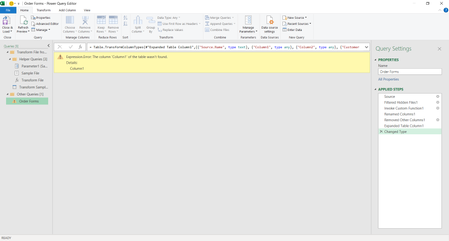
If you look at PQ Doubt 4 image I am getting an error line in the columns.


- Riny_van_EekelenApr 30, 2022Platinum Contributor
Cmpunk In the file I used I had to remove 8 rows att the top. And then I would remover the Change type step and do that in the "expanded" table. Didn't look at the other files if they had the same number of undesired rows at the top.