Forum Discussion

Poly2021
May 31, 2021Copper Contributor
Power Query- Data Cleaning (Unpivot, Transpose,etc)
Hello Team, I was hoping you can help with my training in power query. Im practising how to clean and transform data in power query so that I can easily manipulate and analyze the data in excel. ...
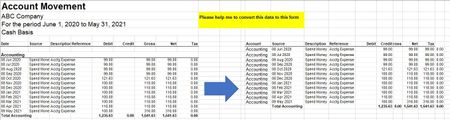
- May 31, 2021
In Advance Editor add two lines to find positions of these texts and apply Table.Range to them like
let
    Source = Excel.CurrentWorkbook(){[Name="Range"]}[Content],
    Start = List.PositionOf(Source[Column1], "Accounting"),
    End =  List.PositionOf(Source[Column1], "Total Accounting"),
    #"Kept Range of Rows" = Table.Range(Source,Start+1,End-Start-1)

in
    #"Kept Range of Rows"

Poly2021
May 31, 2021Copper Contributor
Hey thanks. Im following your suggestion. I already have the first query. Im now on the second, how do I remove the records in between Accounting and Total Accounting? This are actually dates. Do you mean replace the dates with null values?

SergeiBaklan
May 31, 2021Diamond Contributor
In Advance Editor add two lines to find positions of these texts and apply Table.Range to them like
let
    Source = Excel.CurrentWorkbook(){[Name="Range"]}[Content],
    Start = List.PositionOf(Source[Column1], "Accounting"),
    End =  List.PositionOf(Source[Column1], "Total Accounting"),
    #"Kept Range of Rows" = Table.Range(Source,Start+1,End-Start-1)

in
    #"Kept Range of Rows"
- Poly2021May 31, 2021Copper ContributorGreat. Thank you so much