Forum Discussion

alejopiero
May 02, 2022Copper Contributor
Power Query - how to exclude members where measure is blank?
Hi Community, I hope you are doing very good. I have a data model in Excel trough Power Query where I have the Sales table and the Budget table. Also, I've created a master table for products and...
- May 03, 2022
For such model we could use two measures:
Order quantity:=SUM ( Orders[Orders] )

Budget quantity:=CALCULATE (
    SUM ( Budget[Budget] ),
    TREATAS (
        VALUES ( Orders[Product] ),
        Budget[Product]
    )
)
Result is

SergeiBaklan
May 02, 2022Diamond Contributor
With
measure could be
Budget Quantity:=CALCULATE( SUM ( Budget[Budget] ),
   TREATAS( VALUES( Orders[Customer] ), Budget[Customer]   ) )
 alejopieroMay 02, 2022Copper Contributor
Hi SergeiBaklan !!
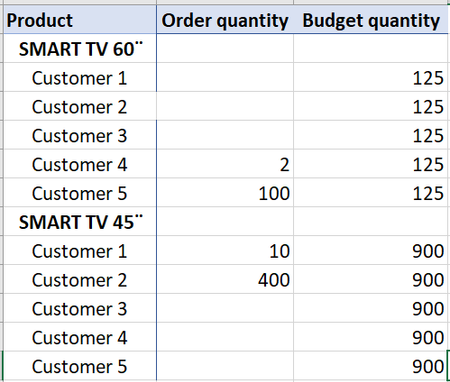
I appreciate so much your help and time. Thank you very much!. My data model is a bit different. What happens is that I don't have budget at customer level. For that reason I agree that the pivot show the budget quantity as drill drown showing for each customer the total budget for the product. However, I don't want that the pivot show every customer when they don't have sales.
My data model:
My expectation is that the pivot show as the following, but I couldn't make it.
Thank you again.
Regards
Ale
- alejopieroMay 02, 2022Copper Contributor
Adding the relationships:
- SergeiBaklanMay 03, 2022Diamond Contributor
For such model we could use two measures:
Order quantity:=SUM ( Orders[Orders] )

Budget quantity:=CALCULATE (
    SUM ( Budget[Budget] ),
    TREATAS (
        VALUES ( Orders[Product] ),
        Budget[Product]
    )
)
Result is